WISMO: how to answer “where is my order” in every chat, at any hour

Muhammad Hassan, FounderLinkedIn
Published Updated
WISMO stands for “where is my order?”, the question shoppers send an online store after they pay and before the parcel arrives. Support teams count each one as a WISMO ticket. It is one of the most common messages an online store gets, and most WISMO tickets can be answered straight from the order record.
We make HiQBot, a customer service platform with AI agents, live chat, guided flows and WhatsApp calling. With a WooCommerce store connected, HiQBot’s AI answers “where is my order” in the chat from the order itself, at any hour, and puts refund, cancellation and address change requests under “Needs you” for your team. This guide shows how, with screens from a sample clothing store connected to HiQBot.
What WISMO means, and what a WISMO ticket is
WISMO is the acronym for “where is my order?”. Online stores and their support teams use it for every message in which a shopper asks about an order that hasn’t arrived: “has it shipped?”, “when will it come?”, “the tracking hasn’t moved”.
A WISMO ticket is one of those messages logged in your support inbox. It may come by email, website chat, WhatsApp, Instagram or phone. Stores track WISMO tickets as a share of all tickets, because a rising share usually means something upstream broke: a courier running late, a shipping email that didn’t send, or an order page that doesn’t say what “processing” means.
Why shoppers ask where their order is
- They paid and heard nothing. No shipping email, or one that landed in spam.
- The status word confuses them. “Processing” sounds like movement; in WooCommerce it means paid and not yet shipped.
- The tracking link is missing or stuck. Ecommerce order tracking only helps if the shopper has the link and it moves.
- Cash on delivery. They want to know when the courier comes and how much to have ready.
- The delivery estimate has passed, or a gift has to arrive by a date.
Shoppers also expect an answer at any hour. In Zendesk’s CX Trends 2026 survey of 6,182 consumers in 22 countries, 74 percent said they now expect service around the clock (Zendesk).
What a good WISMO answer needs
- Proof the order is theirs. Ask for the order number and the email or phone used at checkout. The number a message comes from isn’t proof: a partner, a gift buyer or a stranger can message you too.
- The order as it stands now: its stage, the items, the total, the payment method, the dates, and the tracking details if your store has them. For cash on delivery, the amount the courier will collect.
- A delivery time you can stand behind. Quote the delivery times in your shipping policy; don’t invent a date the courier hasn’t given.
- A next step if something is wrong: a refund, a cancellation, a new address, or a person.
How to answer “where is my order” in chat
HiQBot’s AI agent answers WISMO in the chat the shopper already has open. It asks for the order number and the checkout email or phone, shows nothing until both match, then reads the order live from your WooCommerce store and tells the shopper where it stands. Asked when it will arrive, it quotes the delivery times from your shipping policy.
The same answer works on WhatsApp, Instagram, Messenger, Telegram and LINE, and every chat lands in one HiQBot inbox where your team can read it.
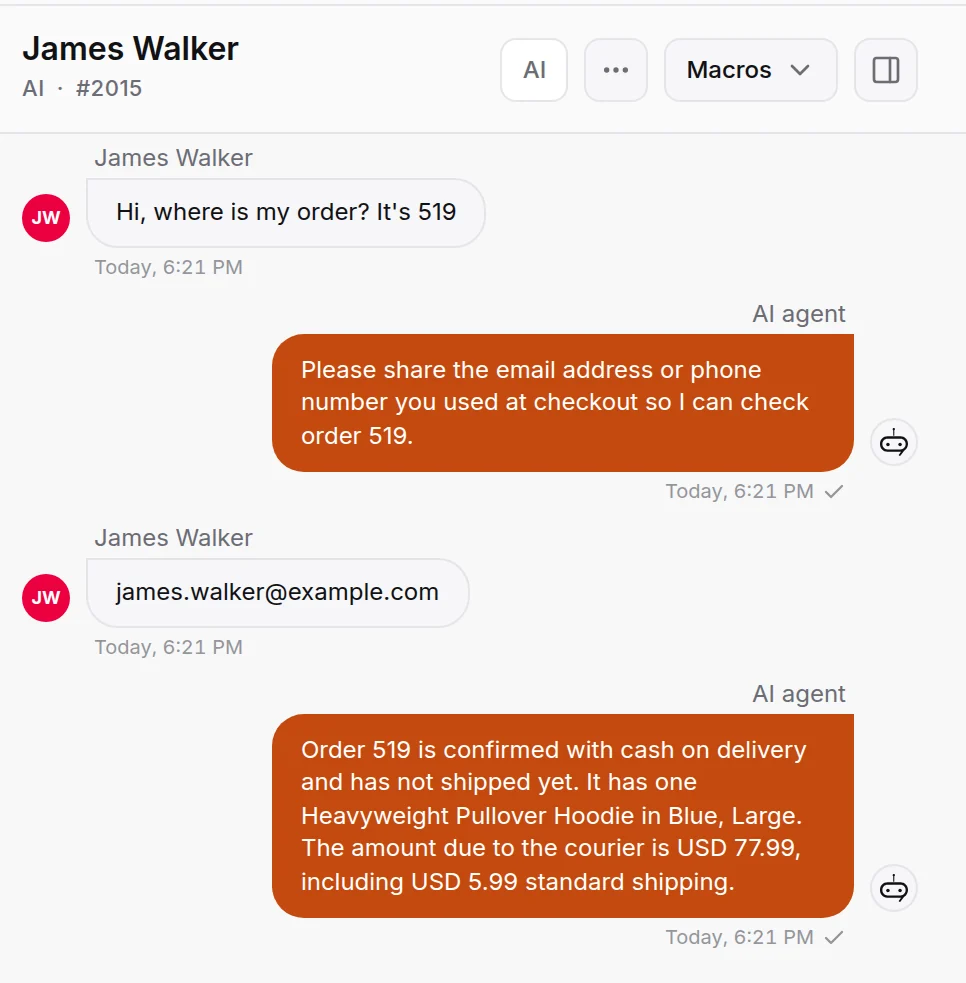
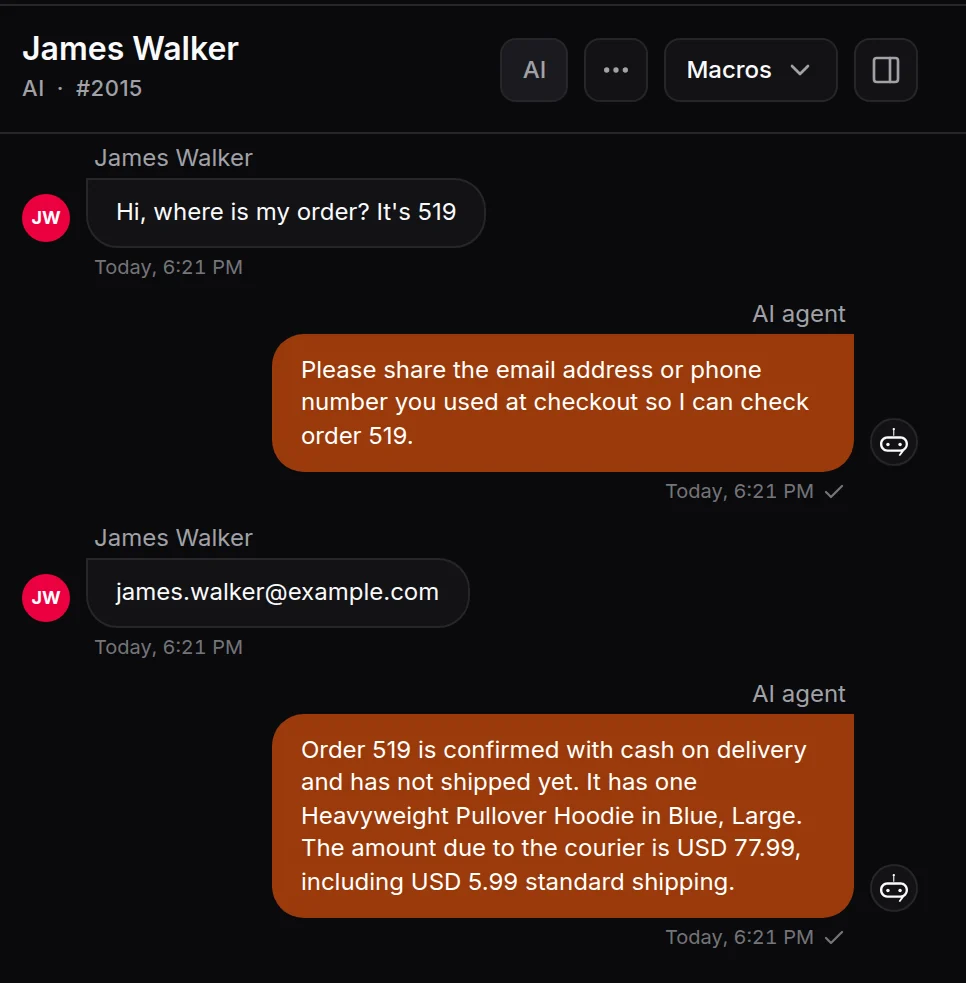
Stores without a website can take orders in chat from a product list or Google Sheet instead. Each customer gets an order number and can ask for that order’s status later in the same way.
What to tell the shopper at each order status
An order status update only helps if the shopper understands it. WooCommerce uses the statuses below (meanings from WooCommerce’s order status guide). The last column is a plain way to say each one in chat.
| Ecommerce order status | What it means | What to tell the shopper |
|---|---|---|
| Pending payment | The order was received but not paid | We have your order, but the payment hasn’t come through yet. |
| On hold | Waiting for the payment to be confirmed | Your payment is being checked. We ship as soon as it clears. |
| Processing | Paid, and the stock is set aside | It is paid and being packed. It hasn’t shipped yet. |
| Completed | Fulfilled | It has been sent. Here are the tracking details we have. |
| Cancelled | Cancelled by the store or the customer | This order was cancelled, so it won’t ship. |
| Refunded | Fully refunded after payment | We refunded it in full. Banks can take a few days to show it. |
| Failed | The payment failed or was declined | The payment didn’t go through, so nothing will ship. You can try again. |
HiQBot’s AI reads the stage, items, totals, payment method, dates and the tracking details your store records, and recognises cash on delivery. It gives the tracking details your store has; it doesn’t promise a delivery date the courier hasn’t given.
When WISMO turns into a request: refund, cancel or change the address
Some WISMO chats end with “then cancel it”, “send it to my office instead” or “I want a refund”. HiQBot’s AI files each one as a request with the shopper’s reason and a check against the policy in your knowledge base. The request waits in Orders under “Needs you”, and your team approves or declines it with one tap, then makes the change in WooCommerce. HiQBot never changes the order by itself, and the shopper can withdraw a pending request in the same chat.
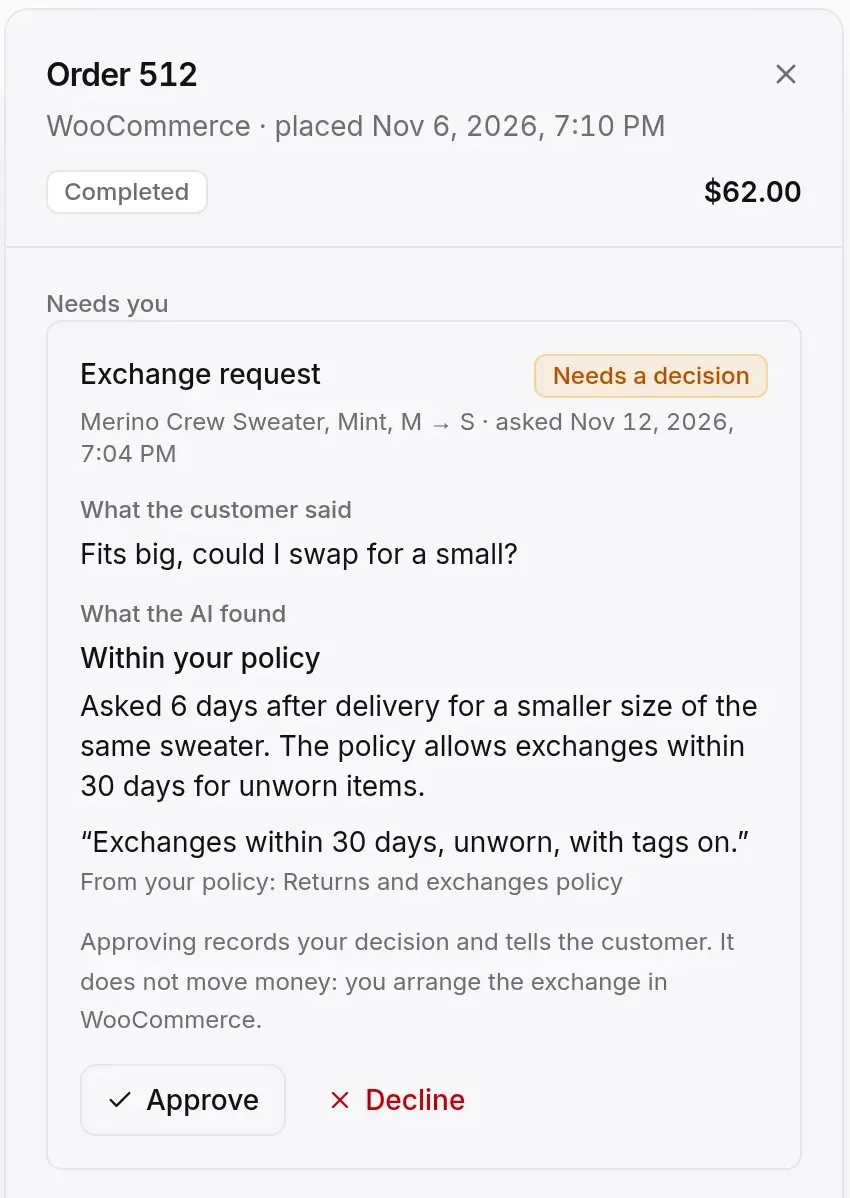
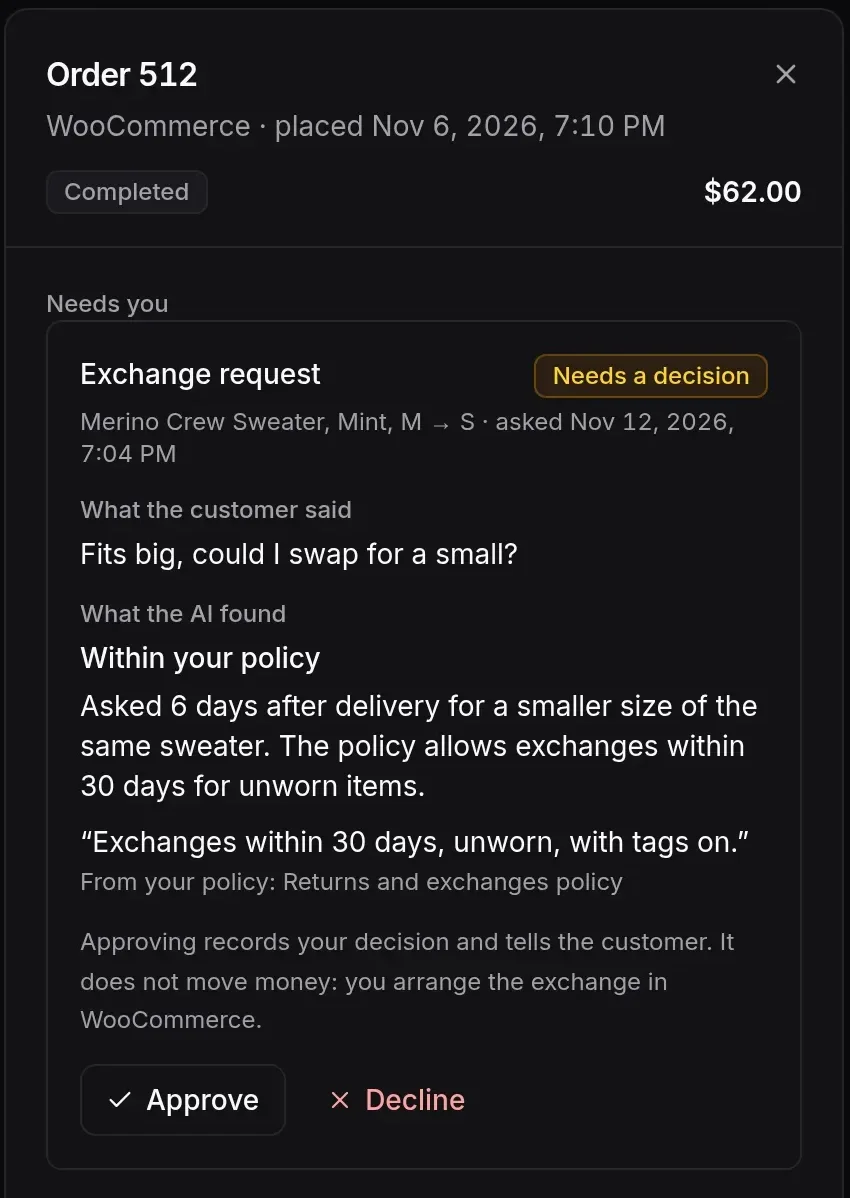
If you need a returns policy for the AI to check against, start with our return policy template.
When the shopper wants a person
A parcel marked delivered that never came, a damaged item or an angry customer needs a person. HiQBot’s AI brings in your team when a shopper asks for one, and the teammate picks up in the live chat inbox with the whole conversation, notes, assignment and AI-drafted replies. Customers who would rather talk can call your WhatsApp Business number, and it rings your team in the HiQBot inbox; the AI itself works in writing.
On WhatsApp, Instagram, Messenger, Telegram and LINE, a guided flow can open the chat with buttons such as Track my order, Returns and Talk to us, so shoppers pick the path in one tap.
How to cut WISMO tickets
| Do this | Why it cuts WISMO |
|---|---|
| Send a shipping email with the tracking link | A shopper with the link checks it instead of asking you |
| Show delivery times before checkout | Shoppers who know it takes 5 days don’t ask on day 2 |
| Explain your status words | “Processing” means paid, not shipped. Say so on the order page |
| Answer “where is my order” in chat, at any hour | The shopper gets the answer while still on your site or in WhatsApp |
| Count WISMO every month | Rising WISMO usually points to a late courier or a missing email |
The where is my order email
Send one email when the order ships, with the courier’s name, the tracking link and the delivery time from your shipping policy. WooCommerce emails the customer when an order is marked completed (WooCommerce); add the tracking link to that email or send your own. Keep the subject plain, such as “Your order 519 has shipped”, so the shopper finds it when they search their inbox.
Order confirmation and shipping update messages
Many shoppers read WhatsApp before email. HiQBot automations can send an order confirmation when an order is placed and a shipping update when it ships, into the customer’s existing chat or as a WhatsApp template Meta approves. A shopper who already has the update has one less reason to ask.
Set it up in HiQBot
- Connect your WooCommerce store from the HiQBot dashboard. Orders, customers and products come across.
- Add your shipping, delivery and returns policy to the knowledge base, so the AI quotes your times and rules.
- Connect the channels shoppers use: website chat, WhatsApp, Instagram, Messenger, Telegram or LINE.
- Ask a teammate to watch Orders → “Needs you” for refund, cancellation, exchange and address change requests.
The full setup for stores is on our AI chatbot for ecommerce page, and the store connection is on the WooCommerce chatbot page. For the other questions shoppers ask before and after they buy, read our ecommerce customer service guide.
Common questions
What does WISMO mean?
WISMO means “where is my order?”. It is the name online stores and support teams give to messages from shoppers asking about an order they paid for that hasn’t arrived yet.
What is a WISMO ticket?
A WISMO ticket is one “where is my order?” message logged in a store’s support inbox, by email, chat, WhatsApp, social DM or phone. Stores count them to see how much support time goes on order status questions.
How do I reduce WISMO tickets?
Send a shipping email with a tracking link, show delivery times before checkout, explain what each order status means, and answer the rest in chat at any hour. An AI agent that reads the order from your store can answer most WISMO without your team.
Can an AI chatbot answer “where is my order”?
Yes, when it is connected to your store. HiQBot’s AI asks for the order number and the checkout email or phone, then reads the order from WooCommerce: its stage, items, totals, payment method, dates and tracking details your store records.
Does HiQBot show live tracking?
HiQBot gives the order status and the tracking details your store records, such as the tracking number. It doesn’t follow the parcel with the courier or predict a delivery date; it quotes the delivery times in your shipping policy.
Can HiQBot cancel or refund an order?
HiQBot’s AI files the cancellation or refund with the shopper’s reason and a check against your policy. Your team approves or declines it under “Needs you”, then makes the change in WooCommerce.
Sources were read on 13 November 2026, and the screens are the real HiQBot product with sample data. How we write and check posts: editorial standards.