Instagram comment to DM automation that replies on the post, then qualifies in the chat
An Instagram comment bot that answers comments publicly by keyword or by meaning, then opens a DM only when you turn that on. The AI agent continues the conversation, qualifies the lead hot, warm or cold, and books, right inside your Instagram channel.
7-day free trial. Comment replies, comment to DM and the AI agent included.
 1/4
1/4auroraandco New ceramic vase collection just dropped. Comment GUIDE and we'll send you the full lookbook.
chloe.bennett GUIDE 🙌
12mReply
auroraandco Sent you a DM, Chloe! 📩
sarah.mitchell Is this still in stock?
9mReply
Comment automation is one feature inside your Instagram channel. See the full Instagram DM agent and live chat or every channel HiQBot unifies.
- 01
Comment lands on the post
Keyword or meaning match, on a feed post, carousel or Reel
- 02
Comment bot replies
A public reply, picked from rotating variants
- 03
DM opens, if you allow it
Inside Meta’s rules for a private reply
- 04
AI qualifies as it goes
Hot, warm or cold, from what they say
- 05
Books or hands over
A calendar slot, or a teammate in the same thread
What an Instagram comment bot does inside your Instagram channel
Your Instagram channel is the Instagram DM agent: the same AI agent and live chat that answer website chat, WhatsApp, Messenger, Telegram and LINE, now answering your Instagram DMs too. The comment bot is a feature that lives inside that channel’s settings, next to the AI persona, routing and hours, not a separate product bolted on the side.
It is also not the mass-commenting software that the term “Instagram comment bot” sometimes turns up. HiQBot never comments on other people’s posts or logs into Instagram as you. It watches comments on your own posts and Reels, replies by keyword or by meaning when a rule matches, and sends a DM only when you allow it. From there the AI agent answers from the documents you uploaded, labels the lead, and books.
HiQBot is a conversational platform for customer service, with AI agents and live chat on website chat, WhatsApp, Instagram, Messenger, Telegram and LINE.
Reply to comments by keyword, or by meaning
Set a trigger as an exact word or phrase, matched whole or wherever it appears in the comment, for words like “price” or “guide”. Or switch the rule to meaning-based matching, so a typo or a close variant such as “giude” still fires the right reply. Either way, matching runs without a model call, so comment rules never spend AI credits.
The public reply rotates between a set of variants instead of posting the same line under every comment, which is also why HiQBot asks for at least three before a rule can go live.
Rotating public replies
- “Sent you a DM, Chloe!”
- “On it, check your DMs!”
- “Just messaged you!”
One of these posts under the comment, chosen at random, so the thread never reads like a script.
Comment to DM: the conversation moves to private, only when you allow it
Turn on the DM step for a rule and HiQBot opens a private reply after the public one, inside Meta’s rules for comment-to-DM messaging. It runs on the feed posts, carousels and Reels you publish. It does not cover Instagram Live comments or Story replies, which Meta handles differently and HiQBot does not automate.
Unlike a DM tool that only drops a link, the thread stays open. The agent answers from your catalogue, asks what it needs to know, and only sends a checkout or booking link once that makes sense. The exact rules, the setup steps and where comment automation tends to go wrong are covered in depth on comment to DM automation.
- Runs on
- Feed postsCarouselsReels
- Not automated
- Instagram Live commentsStory replies
The AI qualifies and books, right there in the DM
Once the DM opens, the same agent that answers your other channels takes over. It can label the lead hot, warm or cold from what the person says, the same way it does in website chat and WhatsApp, and book a meeting from your connected calendar without anyone leaving the thread.
If you want less AI and more control, a rule can run a scripted set of questions instead, asking only what you choose before it hands over or books.
Start from a recipe, not a blank canvas
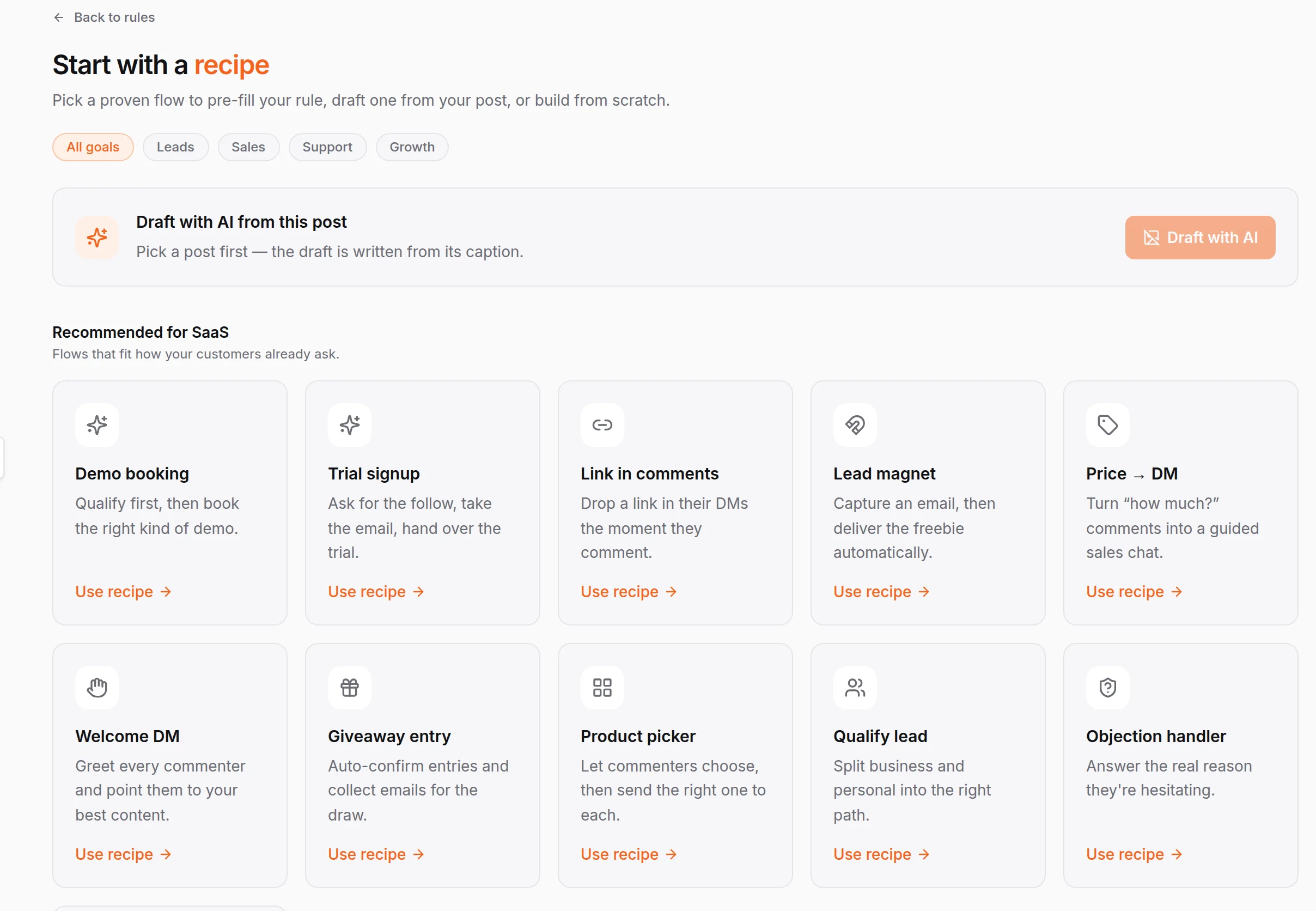
Recipes fill in the trigger words, the public reply and the opening DM for a goal you pick: a demo booking, a trial signup, a link in the comments, a lead magnet, price to DM, a welcome DM, a giveaway entry, a product picker, qualifying a lead, or handling an objection. Filter the gallery by goal, or ask HiQBot to draft a new recipe from the post caption itself.
Open any recipe on the canvas and it is a flow you can rebuild: branch the first DM with buttons, add a delay before a follow-up, split traffic between two messages with an A/B randomizer, capture a detail such as an email or a room size, or gate a step behind a follow request before it continues.
A real HiQBot canvas: comment trigger, first DM with the lookbook link, a delay, an A/B randomizer between two follow-ups, then a thank-you.
Build it from a recipe, then test it live
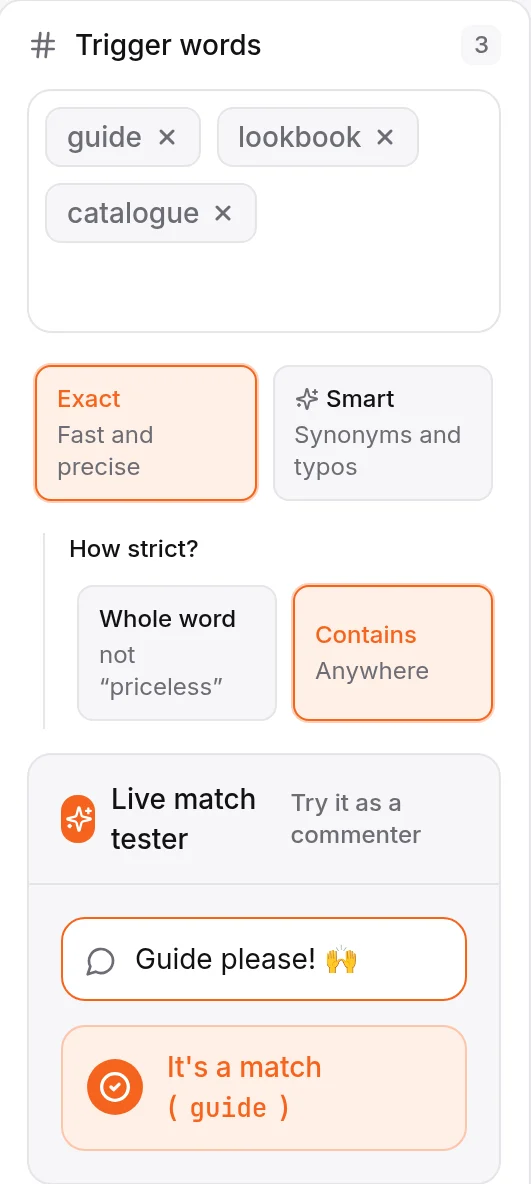
Two more screens from a HiQBot workspace: the recipe gallery you start from, and the live match tester that checks a trigger, with the simulator alongside it, before anything goes out to a real comment.
Start from a recipe, not a blank canvas
Pick a recipe built for your kind of business instead of wiring up triggers from nothing. HiQBot fills in the trigger words, the public reply and the opening DM, and you can filter the gallery by goal or draft a new one with AI straight from the post caption.
- Recipes for demo booking, trial signup, lead magnets and more
- Filter the gallery by goal: leads, sales, support or growth
- Draft a new rule with AI from the post itself
Test the match before you publish
Type a sample comment into the live match tester and see straight away whether your trigger words would catch it, in exact or contains mode. Run the same flow through the simulator before you publish, so the first real comment is not the first time you see it work.
- Type a sample comment and see the match live
- Exact or contains matching on your trigger words
- Run the simulator before you hit Create rule
Instagram comment bots for your kind of business
The same recipes read differently depending on what you sell. A few of the ways businesses set up Instagram comment to DM automation:
- Automotive
A new arrival post takes "PRICE" or "TEST DRIVE" into a qualifying flow that asks budget and timing, then books the test drive on your calendar.
- Hospitality
A giveaway entry or a rates lead magnet turns a comment into a DM, and the AI asks dates and party size before it quotes a room.
- Restaurants
Comment "MENU" on tonight’s special and a welcome DM carries the full menu, with the AI taking the table request in the same thread.
- Travel
A lead magnet sends the itinerary or brochure people asked for, then the AI asks where, when and who’s travelling before it books.
- SaaS
A trial signup or demo booking recipe answers a feature question from the comment, then books the demo without anyone leaving Instagram.
- E-commerce
Price to DM or a lead magnet replies with stock, sizing or a lookbook link, and the AI keeps answering from your catalogue.
- Creators
A product picker or link-in-comments recipe sends a course link or a merch drop, and an objection handler catches "too expensive" before it becomes silence.
Instagram comment bots compared on what happens after the trigger
Most Instagram comment bots and AutoDM tools optimise for the first reply. HiQBot optimises for the whole conversation, on six channels.
After someone comments a keyword
- Typical AutoDM tool
- A preset public reply, or a fixed DM link
- HiQBot
- A comment bot reply, then a DM when you allow it
Answers product questions
- Typical AutoDM tool
- Usually a preset message only
- HiQBot
- From the catalogues, FAQs and policies you upload
Lead quality
- Typical AutoDM tool
- Email capture, or none at all
- HiQBot
- Hot, warm or cold labels, with routing
Booking
- Typical AutoDM tool
- A link out to a calendar
- HiQBot
- Books from your connected calendar in the chat
Other channels
- Typical AutoDM tool
- Usually Instagram only
- HiQBot
- Same inbox as website chat, WhatsApp, Messenger, Telegram and LINE
Looking at ManyChat alternatives for Instagram? ManyChat is strong when you need several chat apps and a large flow library. HiQBot fits when Instagram is one sales and support channel inside a single AI inbox, with qualifying and booking built in rather than bolted on.
Three steps to your first Instagram comment bot
- 01
Connect Instagram
Link your Business or Creator account from the dashboard through Meta’s own connection flow.
- 02
Pick a recipe and set triggers
Open comment automation, choose a recipe, set trigger words, and decide whether the DM step is on.
- 03
Test, then publish the rule
Run the match tester and the simulator, upload the documents the AI should answer from, then publish. Your team can take over any thread from the inbox.
What HiQBot will not do on Instagram
Questions about Instagram comment bots and comment to DM
Last updated
What is an Instagram comment bot?
It watches comments on your own posts and Reels, then replies when a rule matches: a short public reply so the thread looks active, and a DM when you turn that on. It runs on Meta’s official APIs, not a browser login, and it’s one feature inside HiQBot’s Instagram channel alongside the AI agent and live chat on your DMs.
Does it reply by keyword, or does it understand what people mean?
Both. Match a rule on exact words or phrases such as price or guide, or switch to meaning-based matching so close variants and typos still fire the right rule. You can test any sample comment against a rule before you publish it, so you see the match before a real commenter does.
Can the bot message Instagram DMs after a comment?
Yes, when you turn that step on for a rule. After the keyword matches, HiQBot can open a DM inside Meta’s rules for private replies, then keep the conversation going from the documents you’ve uploaded for that inbox.
What happens once someone is in the DM?
The agent can qualify them, labelling the lead hot, warm or cold, and book a meeting from your connected calendar the same way it would in website chat or WhatsApp. You can also script a fixed set of questions instead, if you want more control than full AI.
Do I start from a blank rule, or is there a template?
There are recipes. Pick one built for your kind of business, such as price to DM, a lead magnet or a qualifying flow, and HiQBot fills in the trigger words, the public reply and the opening DM. Build from scratch when a recipe doesn’t fit.
Does this replace ManyChat?
If you want Instagram comment automation as part of one AI inbox across six channels, website chat, WhatsApp, Instagram, Messenger, Telegram and LINE, HiQBot is built for that. If you only need Instagram keyword flows, the feature comparison is at hiqbot.com/manychat-alternative/.
Does it work on Reels, carousels and boosted posts?
Yes, on feed posts, carousels and Reels, and on the boosted version of a post you already have a rule on. Live video comments and Story replies aren’t covered today. The rule runs on your in-feed posts.
Is this safe for my account?
It runs on Meta’s official messaging API with OAuth, never your password, and keeps to Meta’s own limits: one private reply per comment, a seven-day window to send it, and paced sending so a post going viral doesn’t burn through your account’s message allowance in an hour.
What’s the difference between this page and the comment-to-DM setup guide?
This page covers what the comment bot does and who it’s for. The guide at hiqbot.com/instagram-comment-bot/comment-to-dm/ covers Meta’s exact rules, the step-by-step setup, and where comment automation typically goes wrong.
Can my team take over a conversation the bot started?
Yes. Every Instagram DM lands in the same inbox as your other channels. Switch the thread to live chat and a teammate answers with the full history, or let the AI keep handling it end to end.
Answer the comment before they scroll on
Connect Instagram, set one comment bot rule on your best post, and turn on comment to DM only when you want the conversation to continue in private.