A SaaS chatbot that books demos and gets bugs to your engineers
A SaaS chatbot answers buyers on your pricing page, qualifies them by fit and books the demo in the chat. When an existing customer reports a problem, it writes up what happened and opens a ticket your engineers can work from.
7-day free trial. Demos, docs and support tickets included.
- 01
Answers from your docs
Pricing, integrations and setup
- 02
Works out lead or customer
Before anything else
- 03
Books the demo
Or a discovery call, or a proposal
- 04
Writes up the bug
Priority, category, repro steps
- 05
Brings in a person
Same thread, full history
In one inbox:Website chatWhatsAppInstagramMessengerTelegramLINE
Prospect or customer: the first thing it works out
“Our onboarding is a mess, can someone show us around” is a stranger who hasn’t bought anything yet. “Our onboarding flow is broken, nobody can invite teammates” is a customer whose product stopped working. The first is a lead. The second is a ticket. Get that backwards and a support queue fills up with sales conversations, or a paying customer gets pitched a demo for something they already own.
The agent works this out before anything else, the way a careful person reading every message would. It checks whether it recognises the contact as an existing customer, and asks outright when it genuinely can’t tell. That judgement call is most of what an AI agent for SaaS companies actually needs to get right.
HiQBot is a conversational platform for customer service, with AI agents and live chat on website chat, WhatsApp, Instagram, Messenger, Telegram and LINE.
Pricing-page visitors get an answer, then a demo
Someone reading your pricing page already has questions a blog post can’t answer: does it support single sign-on, what changes past a certain number of seats. The agent answers those from your own documentation and policies, and says plainly when a feature genuinely isn’t documented yet, rather than estimating one that sounds reasonable.
Once someone wants to see the product, it works as a demo booking chatbot right there on the pricing page: it checks real free times against your booking hours and existing bookings, offers two or three, and books whichever one they pick with a name, a work email and the time. A visitor who’d rather look around on their own time can ask for a written proposal instead, and a demo already booked can be moved or cancelled later in the same chat, found again by the email or phone it was booked with.
How a b2b SaaS chatbot qualifies a demo request
Qualification
Five things, asked one at a time
Before it offers a time, the agent learns what they actually want, what isn’t working today if anything, when they’d want to start, and whatever you’ve decided matters for your own pipeline, such as team size or the tool they’re moving off. Megan got exactly that on the way to the demo above, down to the fact that Kestrel Home Services is a 25-technician team still running things through a shared spreadsheet.
You choose which of your own fields are required and which are optional. Every qualified lead comes out labelled hot, warm or cold, with a Returning badge on anyone it already recognises.
How AI lead qualification works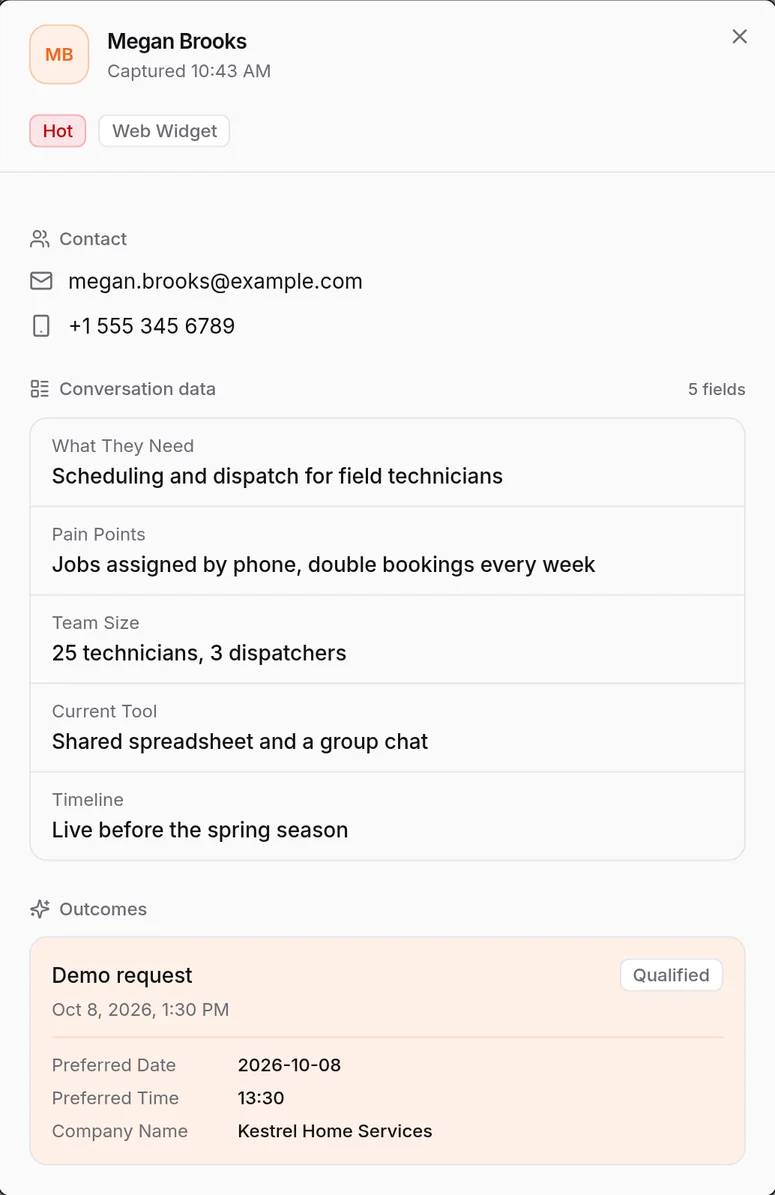
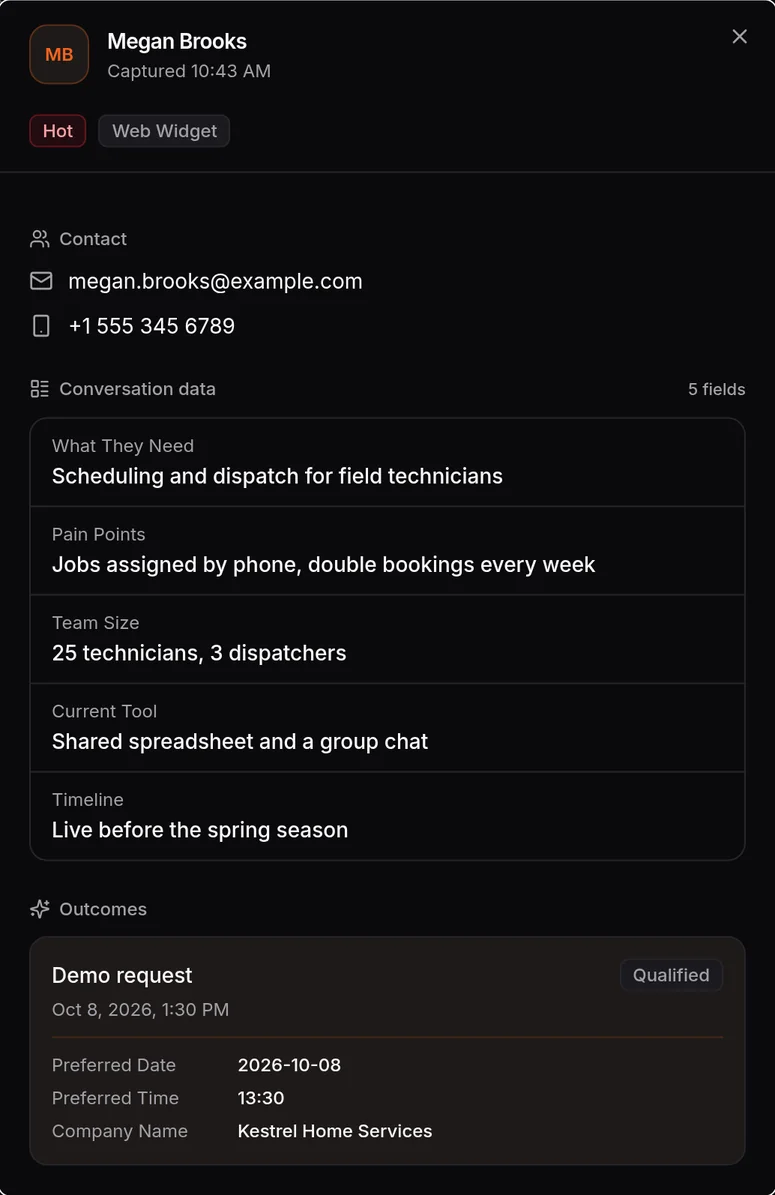
Someone who already knows what they want gets the slot booked on that turn, not a run through the rest of the questions. Someone who’d rather talk it through first can book a discovery call instead of a demo, or ask for a written proposal, and the agent recommends one while keeping the others visible.
Where every demo, discovery call and proposal lands
Nothing booked in the chat stays inside the chat. Every demo, discovery call and proposal request lands in your Leads list the moment it’s confirmed, marked by how qualified the lead is, with the brief attached to the person rather than buried in a transcript someone has to reread.
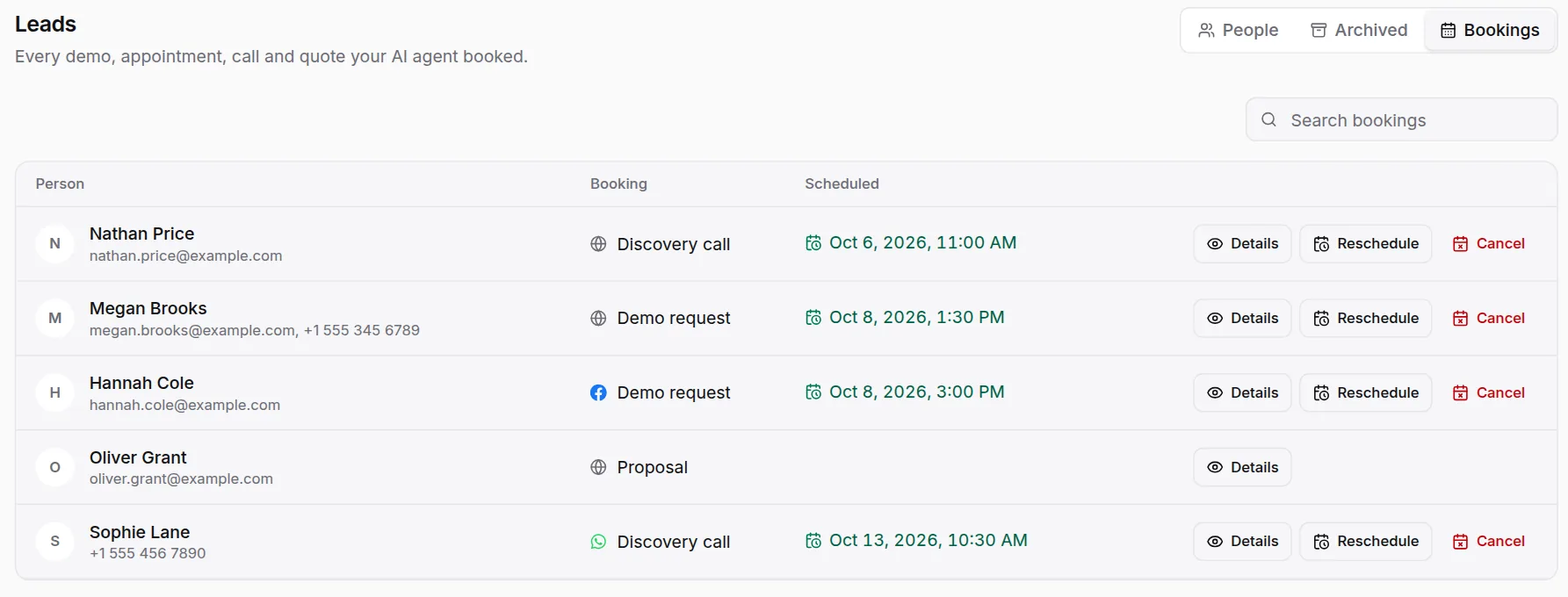
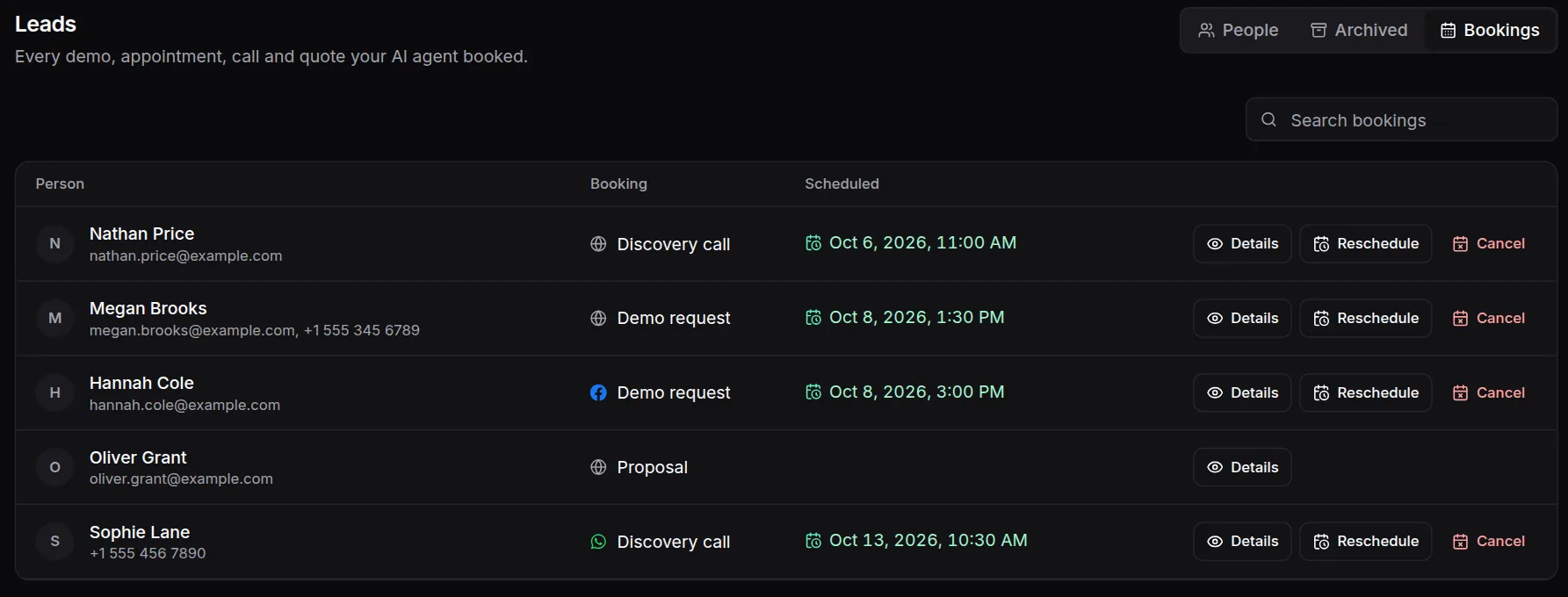
Connect Google Calendar and a demo lands there too, as an event with no meeting link attached; connect HubSpot and the same booking creates or updates a contact, with a deal added if you’ve picked a pipeline for it. See what else HiQBot connects to.
WhatsApp for SaaS buyers, and five other channels
Most B2B buyers still default to email, but a growing share would rather message on WhatsApp or ask a question straight from your website. The same agent answers wherever they write, in one inbox, so customer service for a SaaS business never depends on which app a buyer happened to open.
- Website chatThe chat widget on your site and in your app
- WhatsAppYour WhatsApp Business number
- InstagramDirect messages, including ones started from a comment
- MessengerMessages to your Facebook Page
- TelegramMessages to your Telegram bot
- LINEYour LINE Official Account
A buyer who starts on Instagram and finishes on WhatsApp gets the same agent and the same place in your Leads list. See one inbox for every channel.
SaaS customer support, answered from your own docs
Trial users and new customers lean on in-app help more than anyone, and most of what they ask has already been written down somewhere: a setup guide, a release note, an API doc, a FAQ. An AI chatbot for SaaS support like this answers from that material directly, in whatever language the person writes in, and works inside your own app as well as your marketing site, so nobody has to leave the product to ask.
When your documents don’t cover something, it says so instead of guessing, since a wrong answer about an API limit or a migration step costs more than silence. Every question it couldn’t answer is logged in a Knowledge gaps list, so you know exactly which article to write next, and it never reads a customer’s account, plan or usage to answer in the first place, only your documents and what they say in the chat.
Bug reports that reach Jira already written up
When the agent can’t fix something itself, usually because it’s a bug and not a question, it writes the problem up rather than forwarding a one-line complaint.
After the sale
A write-up, a priority and a category, before the customer even asks
The description HiQBot writes states what broke, the error and the steps to reproduce it, built from the back and forth in the chat. Priority follows a simple rubric: urgent for data loss, security or an outage, high for anything blocking a paying customer, medium for most of what’s left.
Category sorts it into an incident, a question, billing, a feature request or a service request, so the right person sees it without rereading the thread. Daniel gets his ticket number in the chat straight away, and can ask for its status later using that number.
How the AI helpdesk handles tickets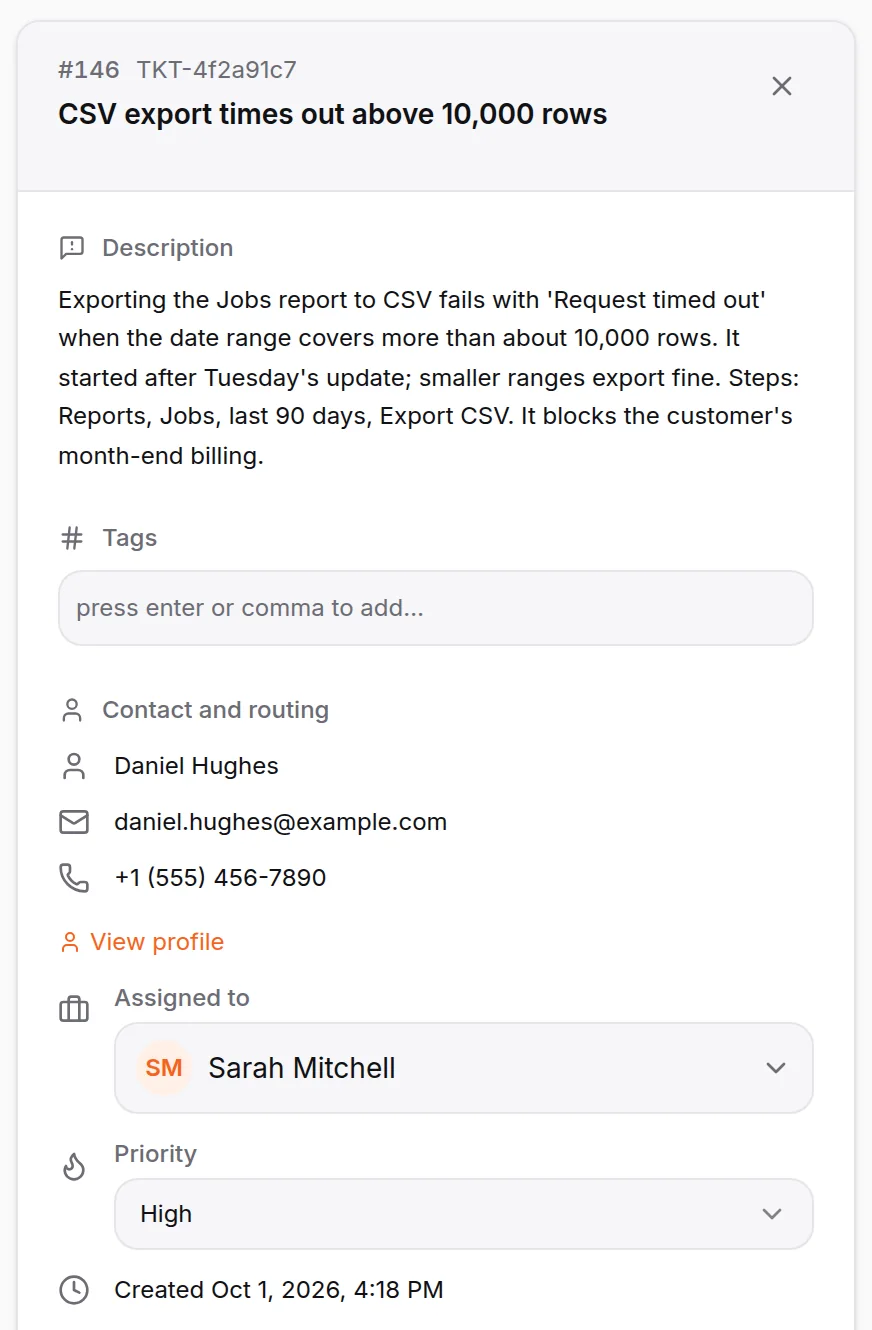
That ticket can go to Jira in one click or on its own, with each category landing as its own issue type: an incident as a Bug, a feature request as a Story. The issue carries the write-up and a link back to HiQBot, and when it moves to Done in Jira the ticket resolves on its own, with Jira working as the SaaS help desk your engineers already use. HubSpot tickets work the same way, and a person on your team replies to the customer; HiQBot never sends the update itself.
SLA targets for every ticket priority
Paying customers notice how fast a blocking problem gets picked up, and the priority rubric feeds straight into that. Set a first response and a resolution target for each of urgent, high, medium and low, and a ticket that blows past either one is flagged as a breach rather than left to quietly age.
The Tickets and SLA report shows median first response and resolution time, with attainment and breaches broken down by priority and channel, so you can see where the queue is actually slipping. A short satisfaction survey goes out in chat once a conversation is marked resolved, so you aren’t guessing at how customers felt about the answer.
When an existing customer wants more
An existing customer asking about another product, more seats or a bigger setup is a sales conversation, so it books the call or takes the proposal request the same way a new prospect would. The lead shows a Returning badge. A request to change plan or cancel becomes a service request ticket instead, routed to your team rather than decided by the agent.
Live chat for SaaS teams, in the same thread
When a buyer or a customer would rather talk to a person, the agent hands over the whole thread, not a summary of it. Whoever picks it up on your team reads everything said so far and can hand it back to the agent once it’s sorted. Outside your hours it says when the team is next in, converted to their own time, rather than leaving the conversation to vanish into an inbox nobody checks until Monday. How live chat and handovers work
What the agent can do in a SaaS conversation
Each of these works on website chat, WhatsApp, Instagram, Messenger, Telegram and LINE. Anything that takes a judgement call waits for your team.
Answer from your docs
Pricing, integrations and setup questions
Say when it doesn't know
No answer invented from a feature list
Book a demo
Only at times that are free in your booking hours
Book a discovery call
For a buyer who wants to talk first
Take a proposal request
Scope written up for your team to price
Your team decides
Open a ticket
Priority and category set on its own
Check, update or close a ticket
By the number given in the chat
Send it to Jira or HubSpot
Status comes back to the chat
Move or cancel a booking
Found by the email or phone used
Hand to a person
Same thread, full history
How to set up HiQBot for a SaaS company
- 01
Pick SaaS & Technology at setup
Tells the agent to expect pricing questions, trials and bugs.
- 02
Upload your docs, pricing notes and policies
So answers come from what you actually ship.
- 03
Choose your qualification details and connect your calendar
Mark each field required or optional.
- 04
Add the chat everywhere buyers and customers write
One snippet for your site, app and chat apps.
- 05
Connect Jira, set your SLA targets, work from one inbox
Demos, proposals and bug reports, one place.
What it will not do
- Promise a feature, an integration or a price your documents don't state.
- Invent a ticket number or a booking that was never made.
- Read your app's user accounts, plans or usage.
- Email a customer a ticket update. Someone on your team follows up.
- Write or send the proposal, or make a phone call. It works in chat.
Who this is built for
SaaS companies, software vendors, developer tools and B2B platforms, plus the IT and software services firms that support them. It is a b2b chatbot built to tell a demo request from a bug report, more than a FAQ widget bolted onto a pricing page.
See how HiQBot’s AI agent behaves across every industry, or compare it with the other industries HiQBot covers.
Other industries we ship for
Questions SaaS teams ask
Last updated
What is a SaaS chatbot?
A SaaS chatbot is an AI agent on a software company’s website and chat apps. It answers product questions, qualifies buyers, books demos, and takes support problems from existing customers. HiQBot does this on website chat, WhatsApp, Instagram, Messenger, Telegram and LINE.
Can it book product demos from the chat?
Yes. It checks real free times against your booking hours and your connected Google Calendar, offers two or three, and books the one they pick. It asks only for a name, a work email and the time, and the demo lands on your calendar and on the lead in HiQBot.
How does it qualify a demo request?
It answers the question first, then learns what they want, what isn’t working today and when they want to start. You can add your own details, such as team size or the tool they use now. Every lead is labelled hot, warm or cold.
Can it tell a prospect from an existing customer?
Yes, and it works this out before anything else. A problem with something you already sold or run for a customer becomes a ticket. A problem someone wants solved is a sales conversation. If it can’t tell which, it asks.
Can it answer onboarding and how-to questions from our own docs?
Yes. Upload your help docs, setup guides, release notes and FAQs, and it answers from them in the customer’s own language. When the answer isn’t in your documents, it says so instead of guessing, and the question is logged so you can fill the gap.
How do bug reports reach Jira?
When it can’t fix a problem itself, it asks for the customer’s email or phone, writes up what broke and the steps to reproduce it, then opens a ticket with a priority and category. The ticket can go to Jira, and Jira’s status comes back to the chat.
Can we set response targets for support?
Yes. Set a first response and resolution target for urgent, high, medium and low tickets. It marks a problem that blocks a paying customer as high priority. Breaches are flagged on the ticket, and the Tickets and SLA report shows how often you hit them.
Do customers get emailed updates on their ticket?
No. The customer gets a ticket number in the chat as soon as it’s opened, and can ask for its status later using that number. Someone on your team follows up by email or phone. HiQBot doesn’t send automatic status emails.
Does it know a customer’s account or plan?
No. It answers from your documents and from what the person tells it in the chat. It doesn’t read your app’s user records, so it won’t quote someone’s plan or usage. A seat change or a billing question becomes a ticket instead.
Is this an IT support chatbot for our own employees?
No. HiQBot is for the customers and buyers who use your product, not your employees’ internal requests like password resets. It answers your customers on website chat, WhatsApp, Instagram, Messenger, Telegram and LINE, and turns their problems into tickets for your team.
Answer the pricing page. Write up the bug.
Try HiQBot on your own docs, pricing page and bug reports, with nothing promised that isn’t in what you gave it.