Real estate Facebook ads: ad types, targeting rules, lead ads and examples

Muhammad Hassan, FounderLinkedIn
Published Updated
Real estate Facebook ads are paid posts that agents, teams and brokerages run through Meta to put a listing, an open house or a valuation offer in front of local buyers, sellers and renters on Facebook and Instagram. Each ad ends in one action: a message, a short form or a visit to your listing page.
We make HiQBot, a customer service platform with AI agents, live chat, guided flows and WhatsApp calling. This guide on advertising real estate on Facebook is for realtors, teams and brokerages who run their own ads. It covers the ad types, Meta’s housing rules, what to do when a lead arrives, and examples you can copy.
Types of real estate Facebook ads
Facebook and Instagram ads are built in one place, Meta Ads Manager. What changes between them is where the click goes and who has to act next.
| Ad type and where the click goes | Good for |
|---|---|
| Ads that open a chatWhatsApp, Instagram Direct or Messenger | Listings, open houses and valuation offers, where people want to ask a question first |
| Lead adsA short form inside Facebook or Instagram | Seller and buyer guides, if someone calls each lead back within minutes |
| Traffic adsYour listing page or website | A listing page with photos, a map and chat on it |
| Real estate catalog adsListings Meta picks from your property catalog | Brokerages with many listings and a catalog kept up to date |
| Video and Reels adsAny of the above | Home tours and area guides filmed on a phone |
Meta describes ads that click to WhatsApp, Instagram Direct and Messenger as ads that “send people who click on your ads directly into conversations with your business” (Meta). Real estate catalog ads, sometimes called dynamic ads for real estate, need a catalog that lists your properties, and Meta then promotes the listings that fit each person’s interest (Meta).
Real estate Instagram ads
Instagram ads are built in the same Meta campaign as Facebook ads. Set the ad’s message destination to Instagram and it opens an Instagram Direct conversation. The housing rules below apply to both apps.
How to run Facebook ads for realtors
Facebook advertising for real estate agents follows the same steps for a single listing or a valuation offer:
- Connect your Facebook Page and Instagram account to one Meta business account.
- Choose where the click goes: a chat on WhatsApp, Instagram or Messenger, a lead form, or your listing page.
- Declare the campaign as housing under Special Ad Categories, before you build the audience.
- Target your city or a radius of at least 15 miles (25 km) in the US and Canada, or 15 km in Europe, around the listing.
- Use real photos or a phone video, the price or the offer in the first line, and one button.
- Start with a small daily budget for one or two weeks.
- Before the ad goes live, decide who answers its messages and give them the listing, the open house date and your showing hours.
In NAR’s 2025 Technology Survey, 39 percent of REALTORS® named social media as the technology that brought them the most quality leads (NAR, 2025). Posting for free is covered in our real estate social media guide.
Targeting rules for real estate Facebook ads
Housing ads run in Meta’s Special Ad Category when the advertiser is in the US or the ads reach people in the US, Canada or Europe. In that category (Meta):
- Age is fixed at 18 to 65+, and you can’t choose a gender.
- Locations must cover at least a 15-mile (25 km) radius in the US and Canada and 15 km in Europe, around any city, address or dropped pin.
- ZIP codes, neighborhoods and location exclusions aren’t available.
- Lookalike audiences aren’t available, and some detailed targeting options are removed.
Once the campaign is declared as housing, Ads Manager won’t accept an audience outside these rules. Because the radius is wide, name the street or neighborhood in the first line of the ad, so people who live there notice it.
The wording has rules too. In the US, a housing ad may not indicate any preference, limitation or discrimination based on race, color, religion, sex, disability, familial status or national origin (Fair Housing Act), and REALTORS® must show their firm’s name (NAR Standard of Practice 12-5). Describe the home, never who should live in it. India’s RERA number and Dubai’s Trakheesi permit are in our real estate advertising guide.
Facebook lead ads for real estate: the first five minutes
A lead ad opens a short form inside Facebook or Instagram, so a buyer or seller can leave a name and phone number without leaving the app. By default, Meta builds lead forms for volume, so they’re quick to send. A higher intent form adds a step where the person reviews and confirms their answers before sending (Meta).
HiQBot doesn’t import Meta lead forms. Those leads stay in Meta or the CRM you connect to it, and your team calls them back. In the first five minutes:
- Call within five minutes, and say which home or offer they asked about.
- If there’s no answer, send a text with one question, such as “Are you looking to buy this spring?”
- Offer two showing or valuation times, not an open question.
- Note the outcome next to the lead, so the next agent knows where it stands.
In Harvard Business Review’s 2011 study of online sales leads, firms that tried to reach a lead within an hour were nearly seven times as likely to have a meaningful conversation as those that waited longer. Follow-up after the first call is in our real estate lead generation guide.
| Compared | Lead ad | Ad that opens a chat |
|---|---|---|
| What the person does | Sends a name and number | Asks a question in their own words |
| Who acts next | Your team, by phone | Whoever answers the chat |
| Where it lands | Meta or your CRM | WhatsApp, Instagram or Messenger (in HiQBot, one inbox) |
| Best for | Guides and offers that don’t need a reply tonight | A home they want to see this week |
Ads that open a WhatsApp, Instagram or Messenger chat
An ad that opens a chat lets the buyer ask about the HOA, the parking or the school district while your ad is still on their screen. In HiQBot, the chat it opens lands in the same inbox as every other message, and the AI agent answers it in seconds, day or night.
The AI answers the question from your listings, then works out whether the person is buying, selling, renting or letting. A buyer is asked about area, budget, bedrooms, timing and, lightly, their mortgage; a seller is offered a valuation visit instead. It asks for a time, a name and a phone number, and says the agent will confirm it.
Here is that chat on WhatsApp, the app a Click-to-WhatsApp ad opens. The buyer asks if a two-bed apartment is still available at 8:52 PM, and two minutes later a Saturday viewing is waiting for the agent to confirm.
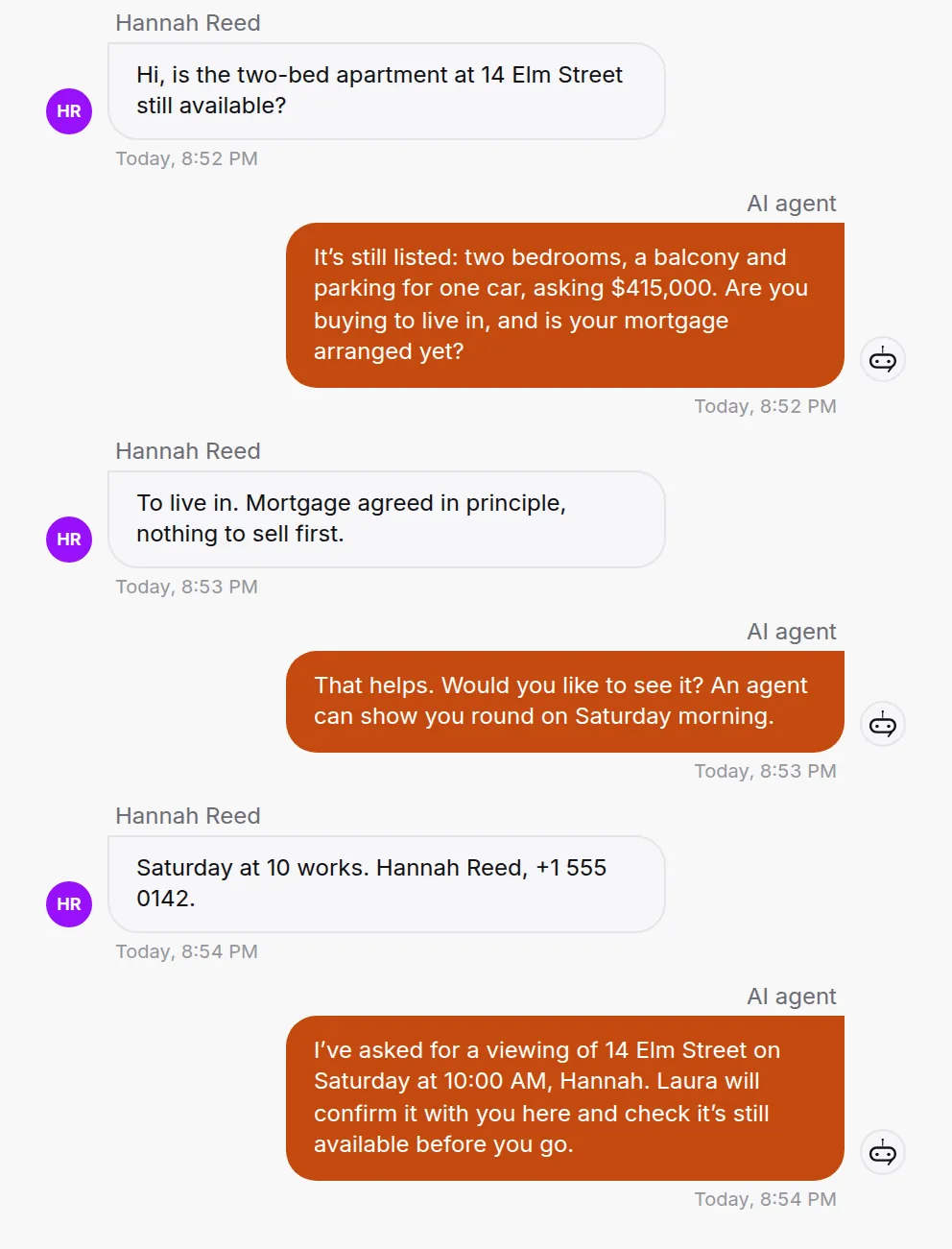
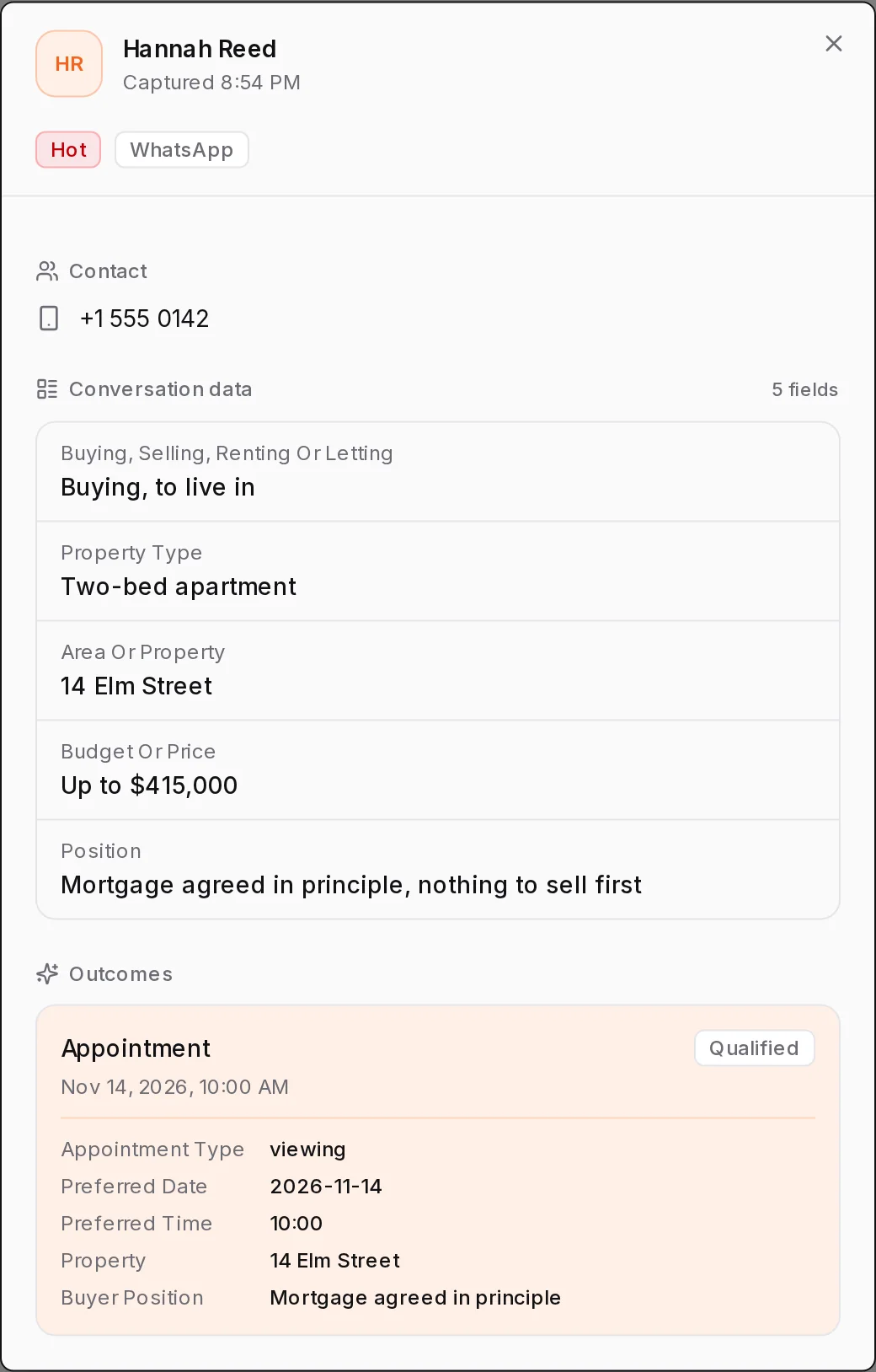
Everything the buyer said is saved on a lead card:
Point a Click-to-WhatsApp ad at the WhatsApp Business number you connect to HiQBot. Buyers who would rather talk can call that number, and the call rings your team in the inbox; the AI itself works in writing.
HiQBot doesn’t reply to comments on Facebook posts or ads, so make the button Send message and ask people in the ad to message you rather than comment.
Real estate Facebook ad examples
The best Facebook ads for real estate name the home or the offer in the first line and ask for one message. These sample ads cover buyers, sellers, renters, a launch and a commercial unit. The last column is what HiQBot’s AI agent does in the chat each one opens.
| Ad and button | What happens in the chat |
|---|---|
| Just listed“Just listed on Elm Street: two bedrooms, a balcony and parking, $415,000. Ask us anything on WhatsApp.”Button: Send WhatsApp message | Answers from the listing, asks if they’re buying to live in and if their mortgage is arranged, then asks for a viewing time the agent confirms |
| Open house“Open house Saturday 11 to 1 at 22 Birch Lane. Can’t make it? Message us for a private showing.”Button: Send message | Gives the open house details and offers a private showing for people who can’t come that day |
| Home valuation“Thinking of selling in Oak Ridge this spring? Ask us for a free valuation visit.”Button: Send message | Asks the address and when they hope to sell, then offers a valuation visit, never a price |
| Just sold“Sold in 11 days on Maple Court. Curious what yours is worth? Message us.”Button: Send message | Settles seller or buyer first, then offers a valuation visit or a showing |
| Video tour“Take a 30-second walk through 6 Pine Road, then ask us about the HOA, parking or schools.”Button: Send message | Answers from the listing and the documents you add, then asks for a showing time |
| Rental listing“For rent from 1 December: one-bed apartment near the station, $1,650 a month. Message us to see it.”Button: Send message | Asks the move-in date, how many people are moving and about pets, then asks for a viewing time |
| New development launch“Launch week at Harbour Gate: one and two-bed apartments with a payment plan. Message us on WhatsApp.”Button: Send WhatsApp message | Answers prices and the payment plan from the brochure you added and asks for a site visit time |
| Commercial property“Retail unit for lease on Main Street, 1,200 sq ft, street frontage. Message us for the details.”Button: Send message | Settles buy or lease, size and timing, then asks for a callback time with the agent |
The AI answers only from the listings and documents you give it, so add the listing, the open house date or the project brochure before the ad goes live. When your listings don’t say a home is still available, it tells the buyer the agent will confirm before the showing. For a launch in India or Dubai, put the RERA number or the Trakheesi permit on the ad itself.
Budget and what to count
There is no set budget for real estate Facebook ads. Run one listing or one offer for a week or two on a small daily amount, keep the ad that brings showings and stop the rest. Follow each ad from spend to signed listing: the chats or forms it started, the showings and valuations requested, the ones that happened, and the listings or sales that came from them.
Cost per showing or listing appointment is the figure to compare between ads. Clicks and spend stay in Meta Ads Manager. In HiQBot each lead shows the channel it came from, but not the ad, so give each ad its own offer or opening line: the first message shows which one the person answered.
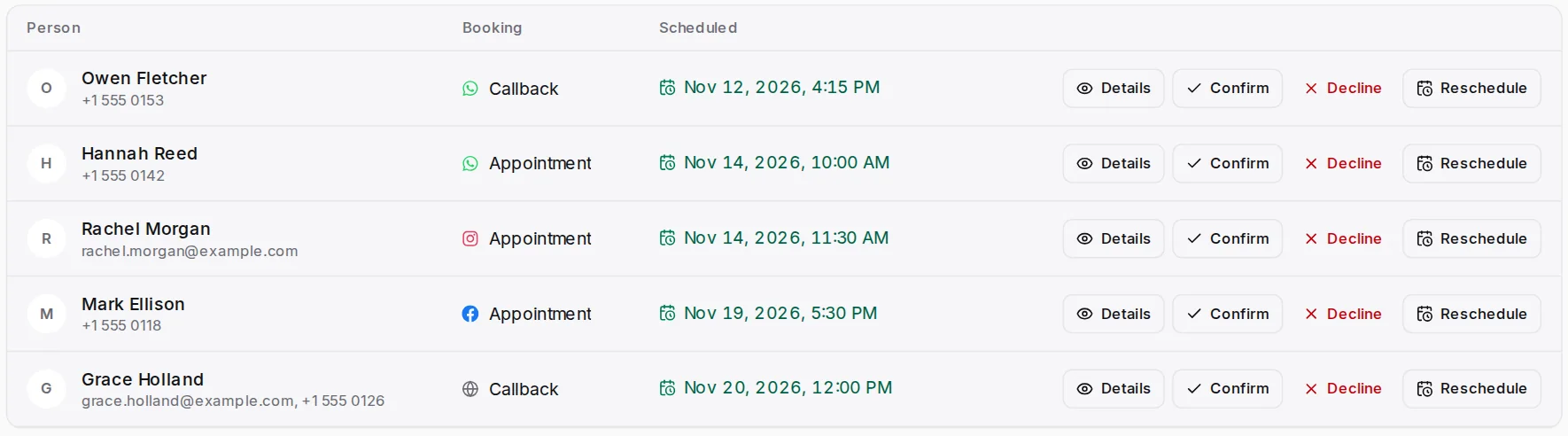
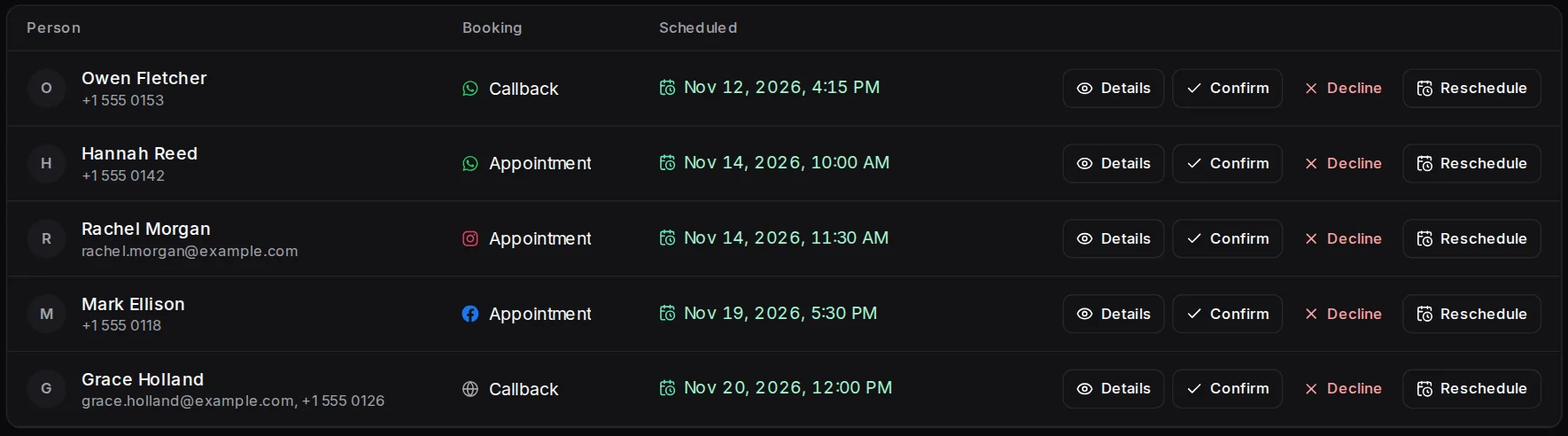
Every showing, valuation and callback lands in one Bookings list for your team to confirm:
Where HiQBot fits in your Facebook advertising
Every chat your ads start sits in one HiQBot inbox with the rest of your messages from website chat, WhatsApp, Instagram DMs, Messenger, Telegram and LINE:
- AI agent: answers from your listings, asks buyer or seller, area, budget, timing and mortgage, and books the showing, valuation or callback for you to confirm.
- Live chat: your team takes over any chat in the same inbox, with notes, assignment and AI-drafted replies.
- Guided flows: buttons such as Buy, Sell, Rent or Talk to an agent at the start of a new WhatsApp, Instagram or Messenger chat, where any answer can go to the AI or to you.
- WhatsApp calling: buyers call your WhatsApp Business number and it rings your team in the inbox.
HiQBot doesn’t run or buy ads, doesn’t connect to Meta Ads Manager, doesn’t import lead forms and doesn’t report which ad a chat came from. Bookings land in HiQBot and on Google Calendar if you connect it. Setup for agents is on our chatbot for realtors page, and the Messenger chatbot page covers Messenger on its own.
Common questions
Do Facebook ads work for real estate?
Facebook ads work for real estate when each ad shows one home or one offer and every message gets an answer within minutes. Compare ads by cost per showing to see which ones pay.
How much do Facebook ads cost for real estate?
Real estate Facebook ads have no fixed price: you set a daily or total budget and Meta charges within it. Start small on one listing for a week or two, then divide spend by the showings and listing appointments each ad brought.
Can I target ZIP codes with real estate Facebook ads?
In the US, Canada and Europe, real estate Facebook ads can’t target ZIP codes, age or gender, because housing ads there run in Meta’s Special Ad Category. In the US and Canada the location must also cover at least a 15-mile radius. Name the neighborhood in the ad’s first line instead.
Are Facebook lead ads good for realtors?
Facebook lead ads are good for realtors when someone calls each one back within minutes. For a home people want to see this week, an ad that opens a chat lets them ask their question and request a showing at once.
Can HiQBot import my Facebook lead ads?
HiQBot doesn’t import Meta lead forms or connect to Ads Manager. It answers the chats that ads open on WhatsApp, Instagram and Messenger, and books the showing or valuation for your team to confirm.
Sources were read on 13 November 2026, and the screens are the real HiQBot product with sample data. How we write and check posts: editorial standards.