AI shopping assistant: what it does for an online store, from product recommendations to checkout

Muhammad Hassan, FounderLinkedIn
Published Updated
An AI shopping assistant is a chat that helps shoppers find and buy the right product in an online store. It reads what the shopper writes, searches the store’s catalogue, recommends products that fit, answers price, stock and shipping questions, and sends a checkout link. Good ones also answer order questions after the sale.
We make HiQBot, a customer service platform with AI agents, live chat, guided flows and WhatsApp calling. This guide is for owners of small online stores and D2C brands. The screens come from a sample clothing store we connected to HiQBot, and every screen is real.
What an AI shopping assistant is
A shopping assistant does what a good shop assistant does at the counter: asks what you need, shows a few things that fit, and answers the questions that stop you buying. An AI shopping assistant does it in a chat, at any hour, from the store’s own data.
Shoppers already use AI to shop. Adobe Analytics measured traffic to US retail sites from generative AI tools up 693.4 percent year on year over the 2025 holiday season, 1 November to 31 December (Adobe, January 2026).
The term means two different things, so check which one you are reading about:
- For stores: a chat on your website, WhatsApp or Instagram that sells your products. This guide is about this kind.
- For shoppers: an app or AI chat that searches many stores and compares prices for the person using it.
Shopping chatbot, virtual shopping assistant, AI personal shopper
These names mostly describe the same tool. “Shopping chatbot” and “shopping bots in ecommerce” often mean older button menus. “Virtual shopping assistant” and “AI personal shopper” lean towards the product-advice part. Whatever the name, compare tools by what they can look up and what they can do.
What an AI shopping assistant does for a store
With a WooCommerce store connected, HiQBot’s AI agent does these jobs in the chat. It aims for the product that fits what the shopper said.
- Finds the product from the shopper’s words. “A warm hoodie for winter walks, under $60” is matched to your catalogue, narrowed by budget, what is on sale and what is in stock.
- Asks one question when it matters. If size or colour would change the picks, it asks in the same reply as the picks, so the shopper isn’t questioned first.
- States its guesses. With no budget given, it says it kept to mid-range, so the shopper can correct it in a word.
- Handles gifts. It asks who the gift is for, and can offer one safe pick, one meant to delight and one that costs less.
- Says when nothing fits. If no product meets the budget or date, it says so and shows the closest, with what each one misses.
- Answers the questions before payment. Price and stock come from your store, and shipping is quoted from your own rates for the shopper’s country and postcode. Tax is shown at checkout.
On WhatsApp, Instagram, Messenger, Telegram and LINE, a chat can also open with guided flow buttons such as New arrivals, Track my order and Talk to us.
Product recommendations in a chat
A product recommendation is a suggestion of what a shopper should buy, based on what they want or what similar shoppers bought. Stores make them in three main ways.
Recommendation engine, product quiz or shopping assistant?
| Recommendation engine | Product quiz | AI shopping assistant | |
|---|---|---|---|
| What the shopper does | Browses; the store shows “you may also like” | Answers fixed questions | Writes what they want in their own words |
| What it works from | Browsing and order history | Answers you map to products | The shopper’s words, your catalogue and your policies |
| Follow-up questions | No | Fixed branches only | Yes: size, delivery cost, returns |
| Where it runs | Product pages, cart, email | A page on your store | Website chat and messaging apps |
| How it ends | A click to a product page | A results page | A checkout link, or a person on your team |
In HiQBot’s chat, recommendations come in two forms. When an item has sold out, the AI suggests up to five in-stock alternatives. When your orders show items that are often bought together, it suggests those too. That list is built from your order history once a day, so a new store starts with none.
When a shopper is torn between two products, the AI says which suits them given what they said, and names the trade-off. The choice stays theirs.
From the chat to your checkout
Once the shopper has picked, the AI sends a checkout link with the items in the cart. The shopper enters their details, picks shipping, sees tax, can apply a discount code and pays on your own WooCommerce checkout. The AI never takes payment and never asks for card details. The link itself creates no order and holds no stock.
On website chat, Telegram and LINE, products show as cards with a photo, price and stock, and website chat adds a checkout button. On WhatsApp, Instagram and Messenger the AI replies in text, and the checkout link arrives as a link. If the shopper hesitates over shipping or returns, the AI answers and leaves the link standing. If they say no, it does not send the link again or keep pushing.
When a shopper is not ready to buy, the AI records what they asked for on a lead card, so your team can follow up.
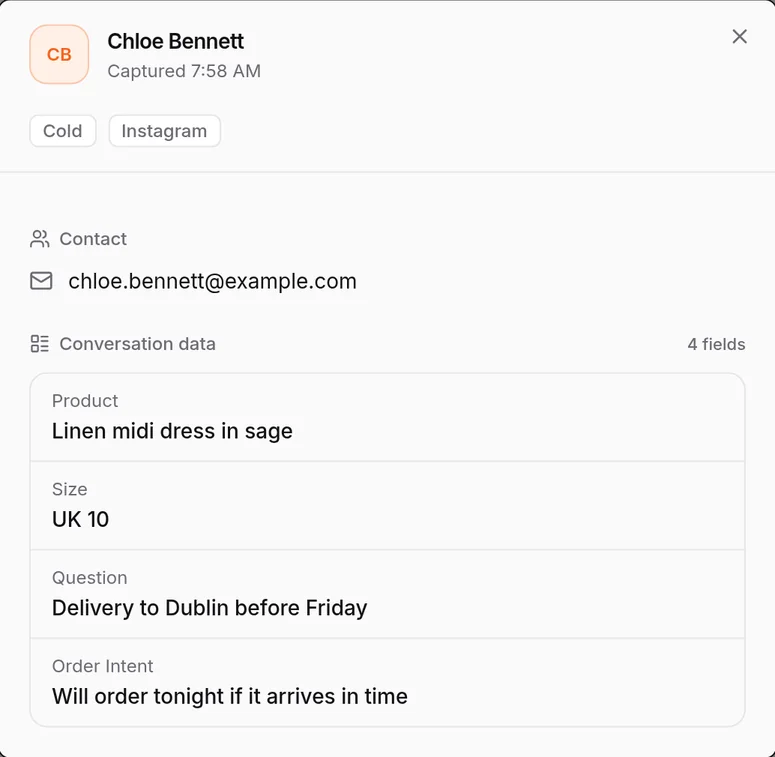
No online store? Upload a product list or link a Google Sheet. The AI finds items the same way and places the order in the chat with the customer’s name and phone, and your team confirms it.
After the sale: order status and returns
After the sale, the AI asks for the order number and the email or phone used at checkout, and shows nothing until both match. Then it reads the order from your store: its stage, items, totals, payment method and tracking details when your store records them. It recognises cash on delivery.
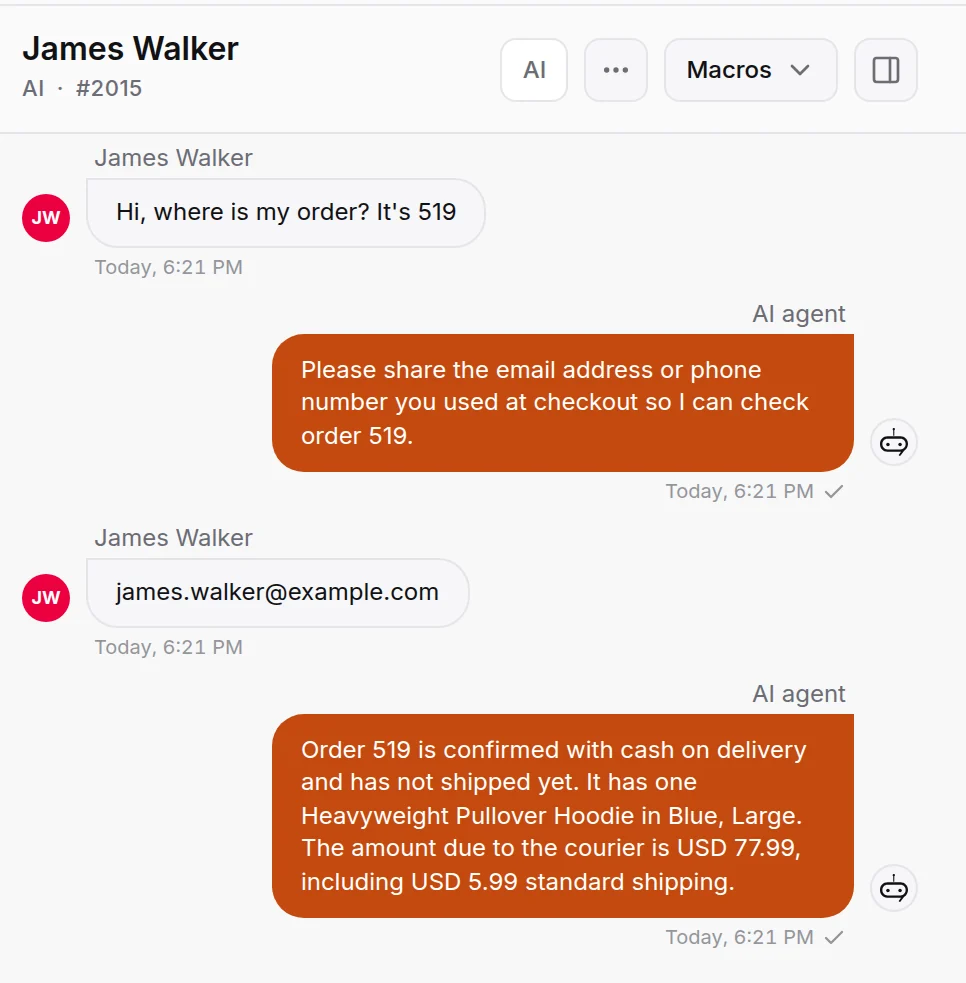
A request to refund, cancel, exchange or change the address is filed with the customer’s reason and checked against your returns policy. A person on your team approves or declines it in HiQBot and makes the change in WooCommerce.
When a person takes over
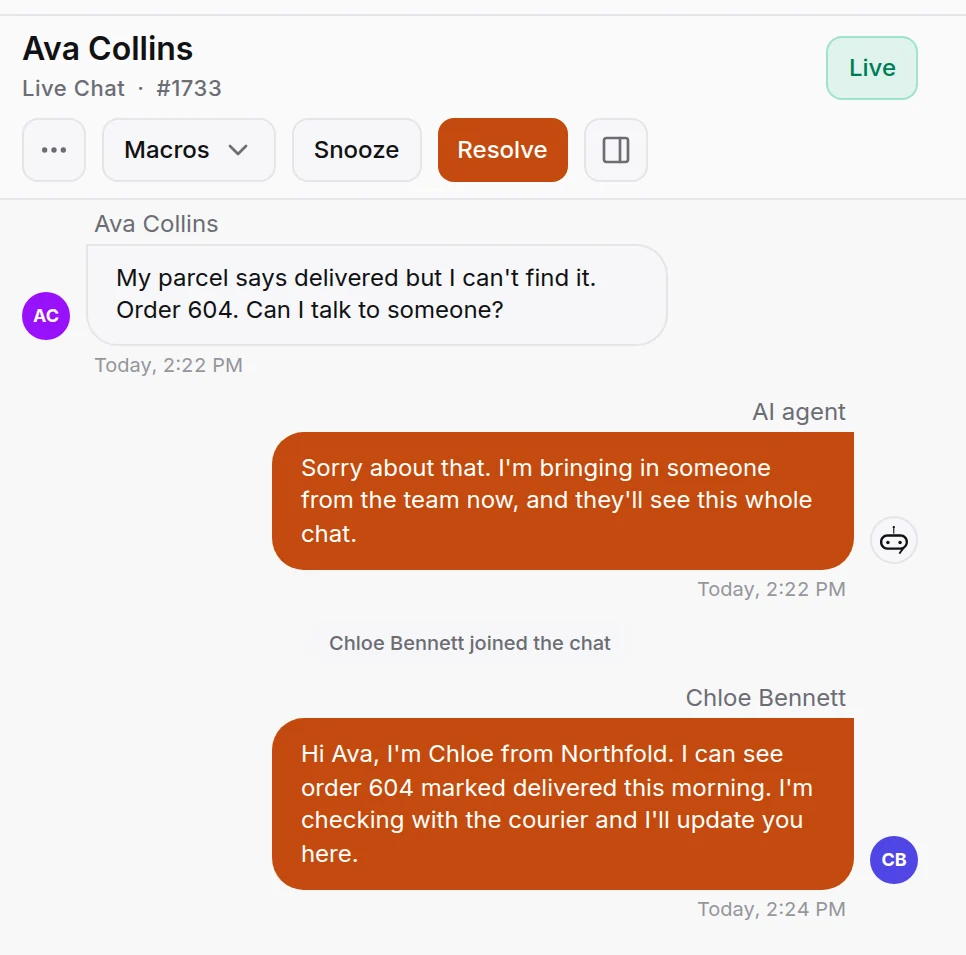
Some chats need a person: a parcel marked delivered that never came, an upset customer, a question your policies do not cover. The AI brings in your team in the same thread, and the teammate sees everything said so far. Customers who prefer to call can ring your WhatsApp Business number, and it rings your team in the HiQBot inbox; the AI itself works in writing. Live takeover and WhatsApp calling come on the higher plans (pricing); on the entry plan the AI takes the customer’s details and you reply from the inbox.
AI shopping assistant tools
Many chat tools now sell themselves as AI shopping assistants. Here are three that say on their own sites that they work with WooCommerce, read on 13 November 2026. We make HiQBot, so check each claim on the vendor’s page before you decide.
| Tool | Recommendations | Order status on WooCommerce | Price and billing |
|---|---|---|---|
| Tidio (Lyro AI Agent) | Recommends and compares products from the synced catalogue and skips sold-out items | Set up as a Smart Action you connect | Lyro from $39 a month for 50 AI conversations ($32.50 a month billed annually) |
| Zipchat | Shows the 3 to 5 most relevant items, each with an explanation | A WooCommerce order-tracking skill you install | $64 a month billed annually ($80 monthly) for 750 AI replies, then $49 per 250 |
| HiQBot | Finds products from the shopper’s words, up to five in-stock alternatives, items often bought together | Built in, once the order number and checkout email or phone match | From $49 a month for 2,500 message credits, US-dollar list price; local currency and tax at checkout |
Sources: Tidio, product recommendations for WooCommerce, Tidio pricing, Tidio product facts, Zipchat for WooCommerce, Zipchat product discovery, Zipchat pricing and HiQBot pricing. All three answer on WhatsApp, Instagram and Messenger as well as the website, and HiQBot also covers Telegram and LINE. More tools, with their full pricing, are in our best AI chatbots for ecommerce comparison.
How to choose an AI shopping assistant for your store
| Ask | Why it matters |
|---|---|
| Does it answer from your real catalogue? | Prices, stock and variants should come from your store, not from text you paste in once. |
| Where does the shopper pay? | A link to your own checkout keeps your payment methods, discount codes and tax rules. |
| Which channels does it cover? | If your buyers message on WhatsApp or Instagram, the assistant has to answer there too. |
| What happens after the sale? | Shoppers ask where their order is and how to return it, and the assistant should answer both. |
| How does a person take over? | Your team should see the whole chat and reply in the same thread. |
| Does it say it is an AI? | Nearly 75 percent of consumers in a 2024 Salesforce survey wanted to know when they were talking to an AI agent. |
| How is it billed? | Tools charge per resolution, per conversation or from a fixed allowance. Work out the cost of your busiest month. |
Survey: Salesforce, State of the AI Connected Customer (15,015 consumers, July and August 2024).
Then test it the way a shopper would. Ask for a gift under a budget you know you cannot meet, ask for a size you do not stock, and ask where an order is without giving the email. A good assistant says no plainly, offers the closest match and asks for the checkout email before it shows an order.
What an AI shopping assistant should not do
Some jobs belong to your checkout and your team. HiQBot’s AI does not:
- take payment in the chat; shoppers pay on your own checkout
- refund, cancel or change an order by itself
- change your products, prices or stock
- message shoppers who left a cart, or send back-in-stock alerts
To tell customers about a restock or a sale, send a WhatsApp broadcast from an approved template to contacts who agreed to hear from you. Getting that agreement is your job (Meta, getting opt-in), and since 1 April 2025 Meta has not delivered marketing templates to WhatsApp users with US numbers (Meta, marketing messages).
The full setup for stores is on our AI chatbot for ecommerce page, and the store connection is on the WooCommerce chatbot page. For other uses of AI in a store, read AI for ecommerce.
Common questions
What are AI shopping assistants?
AI shopping assistants are chats that help shoppers find and buy products. A store’s assistant answers from the store’s catalogue, recommends what fits, answers price, stock and shipping, and sends a checkout link. Shopper apps with the same name search many stores and compare prices for the person using them.
Is there an AI agent for shopping?
Yes. For stores, an AI agent such as HiQBot’s answers shoppers on website chat, WhatsApp, Instagram, Messenger, Telegram and LINE, finds products, sends checkout links and answers order status. For shoppers, several AI chat apps search and compare products across stores.
What is the best AI to help with shopping?
The best AI for a store is the one that answers from your live catalogue on the channels your buyers use and sends them to your own checkout. Test a few with real questions: a gift under a set budget, a size you do not stock, and an order lookup.
What is a product recommendation?
A product recommendation is a suggestion of what a shopper should buy, based on what they asked for or what similar shoppers bought. In a chat it comes with a reason, such as “in stock in your size and under your budget”.
Can an AI shopping assistant take payment?
It depends on the tool. HiQBot’s does not take payment. It sends a checkout link with the items in the cart, and the shopper pays on your own store’s checkout with the payment methods you already offer.
Does an AI shopping assistant work on WhatsApp and Instagram?
Yes, several do, HiQBot’s among them. On WhatsApp, Instagram and Messenger it answers in text with a checkout link. On website chat, Telegram and LINE it also shows product cards, and website chat adds a checkout button.
Sources were read on 13 November 2026, and the screens are the real HiQBot product with sample data. How we write and check posts: editorial standards.