Omnichannel customer service for small teams

Muhammad Hamza, Co-founderLinkedIn
Published Updated
Omnichannel customer service means messages from website chat, WhatsApp, Instagram, and other connected channels arrive in one inbox, in one dashboard. Each channel keeps its own conversation thread, and conversations land there whether the AI agent handled them or a person did.
Most guides to the subject are written for contact centres. Their examples involve large service departments, long channel lists, and software rollouts with a project team. This guide is for the founder answering customers alone and the small team fitting support around the rest of the day.
I run HiQBot. We built our own working rule around the needs of a small team: start with website chat and the messaging channel customers already use most. The website gives you a channel you control and can launch immediately. The second channel brings in conversations that are already happening. Everything else can wait until those two are answering reliably.
What omnichannel customer service means
The useful part of the definition is continuity. A customer can ask a question in website chat and later write on WhatsApp or Instagram, and both conversations still land in one inbox.
Salesforce describes the same distinction as access versus continuity, while Zendesk defines omnichannel around connected context across touchpoints. Those definitions are written for larger service operations, but the aim is the same for a small business. See the current industry definitions from Salesforce and Zendesk.
The term became necessary because multichannel stopped describing the real problem. A business tends to add channels one by one: a widget on the website, a WhatsApp number, then Instagram DMs when customers begin writing there. Each arrives with a separate app and login. By the third channel, customer history is split across several places, and only the person who replied on Tuesday remembers what was promised.
Omnichannel vs multichannel customer service
Multichannel means a business is available in several places. Omnichannel means those places are connected. Five channels in five separate apps are still multichannel. Two channels feeding one inbox, with context preserved, can be omnichannel.
| Question | Multichannel | Omnichannel |
|---|---|---|
| Where messages arrive | Separate app or login per channel | One inbox for connected channels |
| Customer history | Split by channel | One CRM contact when a new conversation arrives with a known email or phone number |
| Who answers | Whoever has that app open | An AI or team rule decides |
| When a customer switches | They often repeat the issue | The new conversation arrives in the same inbox |
| AI handoff | Often becomes a new thread | Stays inside the conversation |
| Knowledge | Answers maintained per channel | One source behind every AI channel |
Suppose a customer books in website chat, confirms the time on WhatsApp the next day, and sends an Instagram DM to move it. Your team finds all three conversations in one inbox.
The channels a messaging-first business should connect
A small team running omnichannel customer service does not need every possible channel on day one. It needs the few channels where customers already ask questions, all feeding the same place. HiQBot connects six in this order: website chat, WhatsApp, Instagram, Messenger, Telegram, and LINE.
Website chat
A website chat widget is the simplest place to begin. You control the site, there is no platform approval queue, and the widget can be installed with one tag. It is often where a buyer asks the first question before choosing another follow-up channel.
WhatsApp matters when it is already part of how customers buy from you. HiQBot connects to the WhatsApp Business Platform through Meta's signup flow inside the dashboard. Coexistence mode lets an eligible business keep using its WhatsApp Business app while the connected number also works in HiQBot. Approved templates stay available for consent-based customer messages.
HiQBot's Instagram comment bot includes direct messages, comment automation, publishing, and account insights. It is available on Solo, so a small business can connect it without moving to a team plan.
Messenger, Telegram, and LINE
Messenger is useful when a Facebook page still receives questions. A Telegram chatbot fits businesses whose customers already use Telegram, while a LINE chatbot covers an important messaging channel in markets where LINE is established. All three are available on Solo too, like every other channel. What each one does is on the supported channels page.
Each connection can use its own AI agent and instructions. WhatsApp can qualify enquiries while Instagram answers questions about a post. Your team still works from one view, even though each channel has its own setup underneath.
What a connected setup changes
New conversations can join an existing contact
Each channel keeps its own conversation. When a new conversation comes in with an email address or phone number that already belongs to a contact, HiQBot adds it to that contact in your CRM, so your team sees the history in one record. A WhatsApp conversation always carries the customer's phone number. Instagram, Messenger, Telegram, and LINE conversations carry no email address or phone number.
There is one queue to watch
Without a connected inbox, someone checks WhatsApp on a phone, Instagram in a browser, and the website widget somewhere else. One queue removes that memory test. A message does not sit unseen because the person who normally watches one app is away.
The agent uses the same source material
The AI answers from documents you upload, so prices, opening hours, and policies do not need to be rewritten for each channel. It detects the language a customer writes in and replies in that language.
A new teammate can read the history
When someone covers a day off, they can read each conversation thread instead of asking for a verbal handover. Starter and Growth add team seats, assignment, roles, and reports, with deeper analytics including CSV export and knowledge-gap reporting.
How to set up omnichannel customer service with a small team
- Pick two channels using last month's messages. Start with website chat and whichever messaging channel already receives the most useful questions. At HiQBot, our rule is to leave the remaining channels off until the first pair is answering reliably.
- Connect both to one inbox before automating. Spend several days reading the incoming conversations. The repeated questions will tell you what the AI should answer first, while arrival times will tell you when a human needs to be available.
- Separate routine answers from human decisions. Prices, opening hours, availability, and booking requests can come from your documents. Complaints, custom quotes, and questions about money already paid usually deserve a person.
- Write the handoff rule in one sentence. A useful starting point is: pass the conversation when the customer asks for a person, the answer is missing from the knowledge base, or a refund is involved. On Starter and Growth, the system can check working hours and assignment capacity before routing the thread.
- Review a sample every week. Read conversations from each active channel. A wrong answer points to a document that needs correction. A late handoff points to a rule that needs tightening. Keep the review short enough that it actually happens.
A channel can also run in live chat mode on Starter and Growth. In that mode, the AI is skipped and the conversation goes to a person on shift. Human replies do not draw message credits. If optional AI intake is enabled, one weighted credit charge is made when the conversation reaches a person, with no per-reply charge after that. This keeps the omnichannel customer service model intact even on channels that your team chooses to answer from the first message.
What omnichannel customer service costs with HiQBot
HiQBot has three paid plans, each with a seven-day trial. The figures below were checked against the live plans API on 13 September 2026. A payment method is required for the trial, but it is not charged during the seven days. Cancel before the trial ends if you do not want it to become a paid subscription.
| Plan | Monthly price | Seats | Channels and role |
|---|---|---|---|
| Solo | $49 | 1 workspace, 0 live chat | All six channels with an unattended sales agent |
| Starter | $139 | 2 workspace, 2 live chat | Human handoff, live chat mode, team roles, reports, the support agent, tickets with Jira and HubSpot linking, and advanced analytics |
| Growth | $229 | 5 workspace, 5 live chat | Starter plus WhatsApp voice calling, 10,000 credits, and priority support |
Annual prices are $490, $1,390, and $2,290. HiQBot's live plan data lists a monthly allowance of 2,500 message credits on Solo, 6,000 on Starter, and 10,000 on Growth. One Core AI reply uses one credit. Balanced and Max replies use more. There is no automatic overage billing: AI replies pause at zero until renewal, an upgrade, or a credit add-on. The pricing page holds the current plan details.
Where the conversations land
Website chat, WhatsApp, Instagram, Messenger, Telegram, and LINE conversations arrive in one omnichannel inbox. Each channel keeps its own thread, including the history of any AI and human handoff. Google Calendar can receive bookings on every plan, and HubSpot can connect contacts and deals.
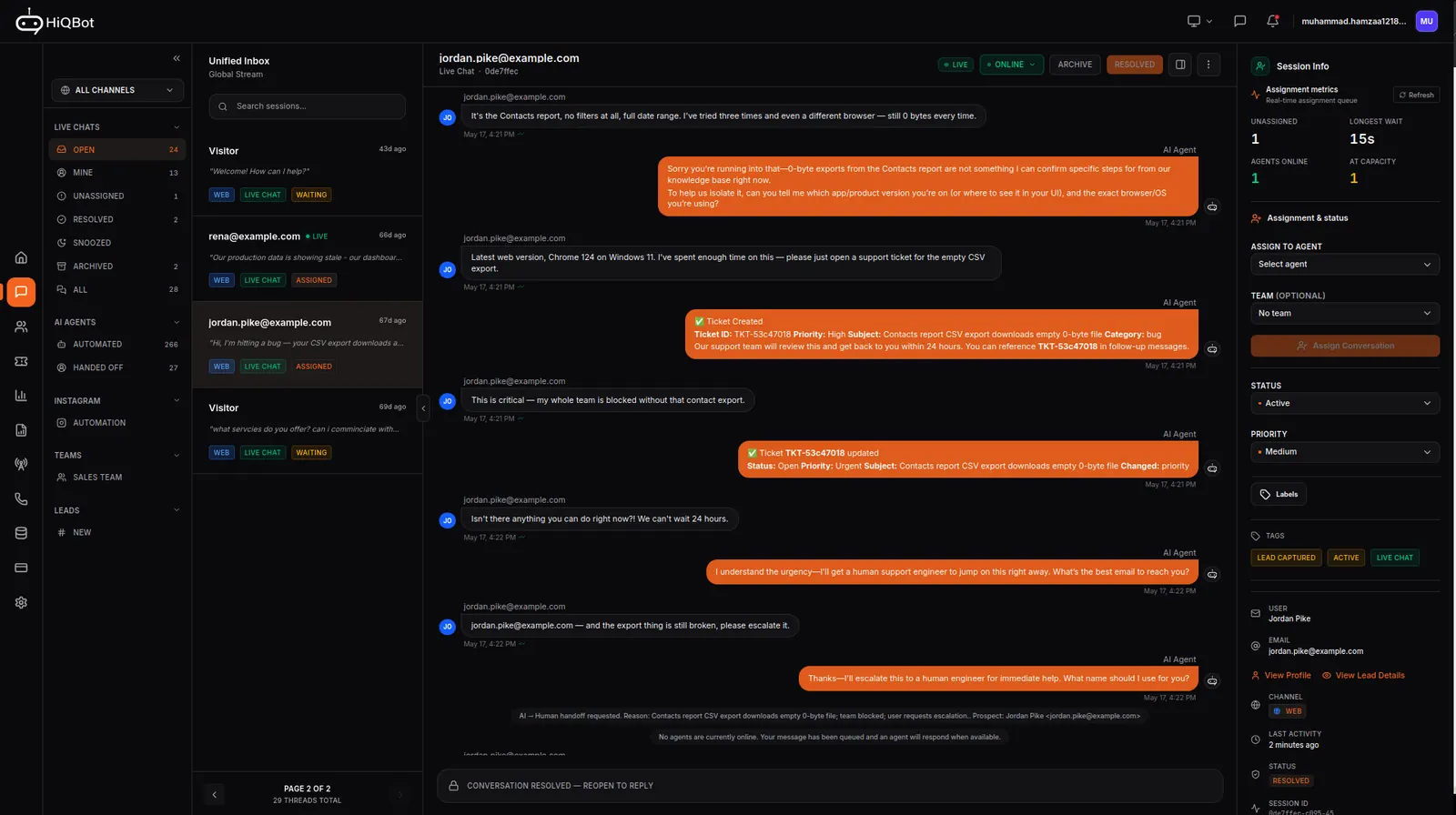
The customer sees none of this machinery. They keep using the channel they prefer. The change is on your side: fewer places to check and a clear point where the AI stops and a person takes over.
Common questions
Is omnichannel customer service worth it for a small business?
Omnichannel customer service becomes useful once customers contact you in more than one place. The immediate gain is operational: fewer missed messages and less app switching.
Does the AI agent know what a customer said on another channel?
No. The AI agent answers from the conversation in front of it and your knowledge base. It does not read the customer's threads on other channels.
How many channels do you need?
Two connected channels are enough. Start with website chat and the messaging app that already produces customer conversations, then add another only when there is a reason to monitor it.
Does a small team need a contact centre?
No. A shared inbox, a narrow knowledge base, and one clear handoff rule are enough to begin. The setup should remove coordination work rather than create a new operations department.
Can one person run it?
Yes. Solo puts website chat, WhatsApp, Instagram, Messenger, Telegram, and LINE conversations in the unified inbox for one owner, with the sales agent answering unattended. Starter is the first plan with live chat seats, so it is the point where teammates can take over and reply inside conversations.